
For hosted or virtual UK numbers, there is no dial-code to memorise. The “code” of call forwarding is your provider’s routing rule, set inside a control panel, that sends incoming calls to a mobile, a landline, or a SIP/VoIP endpoint. It can point calls to one staff mobile, several handsets in sequence, or a failover destination if nobody answers. The rest of this guide covers how that routing works, how to configure it, and what to check for compliance before you flip the switch.
TL;DR:
- Call forwarding on hosted numbers relies on control panel routing rules, not dial codes, enabling instant changes without handset inputs.
- Proper setup involves selecting the correct rule type, verifying the destination format, and testing from an external line to confirm correct routing and presentation.
- Call forwarding costs depend on the provider’s plan, with most including bundled minutes rather than charging per forwarded call, but mobile network tariffs may still apply.
- When porting numbers, businesses should recheck forwarding rules immediately after migration to prevent call loss, and schedule the port during low-traffic periods.
- Ensuring the caller’s number displays correctly requires setting the presentation number properly, as misconfigurations can impact customer callbacks and compliance.
Table of Contents
- What is the code of call forwarding for a hosted number?
- How do I set up or change forwarding on a hosted number?
- Does forwarding affect what number the caller sees?
- What happens to forwarding when you port a number?
- Why isn’t my call forwarding working?
- What’s the best way to configure forwarding long-term?
- What are the standard call forwarding codes on mobile networks?
- Unconditional, busy, no-answer or unreachable: what’s the difference?
- How do you check if call forwarding is active?
- Do forwarding codes work the same across every carrier and phone?
- What are the costs and limits of using forwarding codes?
- Why CLI settings matter more than the routing rule itself
- Get a memorable number with forwarding built in from day one
- Sources
- FAQ
What is the code of call forwarding for a hosted number?
Ask “what is the code of call forwarding?” for a memorable business number and the honest answer is: it depends what you mean by code. On a personal mobile handset, forwarding is triggered by a short dial string typed into the phone. On a hosted or virtual number, that concept doesn’t apply. The number itself lives on the provider’s network, so forwarding is a setting you save in a web portal, not a code you dial.
That distinction matters for anyone who has bought or rented a memorable 01, 02 or 07 number specifically to route calls somewhere else. The provider’s platform holds the rule that decides where each call goes: a named staff mobile, a landline extension, or a SIP URI on a VoIP system. Change the rule, and the routing changes instantly, with no need to touch a handset at all.
Providers typically offer several rule types rather than one blanket switch. You can set calls to forward always, only during business hours, only when a line is busy, or only when the primary destination fails to answer within a set number of rings. Some platforms also support hunt groups, where a call rings several devices in sequence or all at once until someone picks up.
Onward routing describes how calls reach a number that has been ported to a new provider: the call typically still travels via the original network before being redirected onward, which Ofcom’s routing statement explains is the standard mechanism industry has used, with direct routing as a more efficient alternative some networks are moving towards. For a business relying on a hosted memorable number, this is largely invisible day to day, but it explains occasional latency on ported lines and why testing after any port matters.
How do I set up or change forwarding on a hosted number?
Setting up forwarding on a hosted memorable number is a control-panel job, not a phone-settings job. The exact screens vary by provider, but the sequence is consistent enough to follow anywhere.
- Sign in to your provider’s portal using your account credentials, then locate the number management or “my numbers” section.
- Select the specific number you want to configure. If you hold several memorable numbers, check you’ve picked the right one before saving anything.
- Add the destination. Enter it in the correct format: an 01/02 landline or 07 mobile number in standard UK notation, or a SIP URI if you’re routing into a VoIP system.
- Choose the rule type. Decide between always forward, business-hours-only, forward on busy, or forward on no-answer, depending on how your team actually works.
- Set the presentation number. Decide whether the person answering sees your business number or the original caller’s number, since this affects how staff respond and whether callbacks reach the right line.
- Save the rule and place a test call from an external line, ideally a mobile not connected to your business account, to confirm it lands where you expect.
Once the rule is live, don’t assume it’s working just because the portal says “saved.”
- Call the number from an outside line and time how long it takes to connect.
- Check that the correct presentation number appears on the receiving device.
- Test each rule type separately: let one call ring out unanswered, and try one during and outside business hours.
- Confirm voicemail or failover kicks in correctly if the primary destination doesn’t pick up.
Pro Tip: Run your first test calls from a personal mobile that has nothing to do with the business account. Testing from a company phone can mask routing errors that only show up on a genuinely external line, because some networks treat internal and external calls differently.
If you’re routing into a VoIP system for the first time, it’s worth reading through a VoIP telephone system setup guide before you configure SIP destinations, since endpoint formatting errors are one of the most common causes of failed forwarding.
Does forwarding affect what number the caller sees?
Every forwarded call carries a Calling Line Identification, or CLI, and what shows on the receiving screen has real regulatory weight, not just cosmetic value. Ofcom’s general conditions require providers to deliver valid, dialable CLI wherever it’s technically feasible, and that principle sits behind most of the presentation options in a hosted control panel, as set out in the general conditions of entitlement.
For a business forwarding calls to staff mobiles, the practical question is simple: does the caller’s original number appear, or does your business number replace it? Get this wrong on outbound marketing calls and you risk more than a confused customer.
- Presented CLI must be genuine and callable, not a spoofed or invalid number.
- Regulators have specifically examined CLI on direct marketing calls, with proposals covered in the CLI consultation from DCMS and government, which also sets out enforcement risk for silent or abandoned calls.
- Ofcom and the ICO can both act on persistent CLI misuse under PECR, separate from any marketing consent issue.
If any part of your forwarded call volume touches outbound marketing, keep a record of which presentation number was live on which dates, and make sure that number is one you actually control and can be called back on.
What happens to forwarding when you port a number?
Porting a memorable number between providers doesn’t switch off forwarding, but it does introduce a window where things can wobble. Ofcom’s rules on number portability require providers to let customers keep their number when switching, and onward routing between the old and new network is the mechanism that keeps calls connecting during that transition.
- Coordinate the exact cutover time with your gaining provider rather than assuming it happens instantly.
- Re-check your forwarding rules immediately after the port completes; some platforms reset destination settings during migration.
- Expect the possibility of a short interruption, and schedule the port for a low-traffic period, evening or weekend, to reduce business impact.
- Keep a note of your working configuration beforehand so you can rebuild it fast if anything resets.
If you’re moving a number between carriers, our guide to switching provider while keeping your number walks through the LOA and PAC steps in more detail.
Why isn’t my call forwarding working?
Most forwarding faults trace back to one of a handful of causes, and you can usually diagnose them yourself before raising a support ticket.
- Format errors — a mistyped digit or missing country code on the destination number will silently fail or misroute.
- Blocked destinations — some mobile networks block calls from unfamiliar or withheld numbers, which can stop a forwarded call reaching a personal handset.
- Presentation mismatches — the receiving device shows a number that doesn’t match what you configured, usually a sign the rule saved incorrectly.
- SIP registration or codec errors — for VoIP destinations, a handset that’s fallen off registration, or a codec mismatch, will drop calls that a landline test would pass.
Run a test call, then check the portal’s call logs, since most hosted platforms record detailed call traces that show exactly where a call was routed and why it failed, useful evidence if you need to escalate to support.
Pro Tip: Before contacting support, capture a screenshot of the failed call log entry alongside your saved forwarding rule. Providers resolve tickets far faster when you hand them the exact timestamp and routing path rather than a description of “it didn’t ring.”
What’s the best way to configure forwarding long-term?
A few habits keep forwarding reliable once the initial setup is done and you’ve moved on to running the business.
- Present your business number by default on any line where customers might call back, so returns don’t land on a personal mobile.
- Set a failover destination for every rule, never leave a “no answer” scenario with nowhere for the call to go.
- Build out-of-hours rules deliberately rather than leaving business-hours-only lines open around the clock by accident.
- Restrict portal admin access to named staff, and rotate SIP credentials periodically if you’re on a VoIP setup.
- Keep a simple written log of any configuration changes and their dates, so you can trace a fault back to a specific edit later.
What are the standard call forwarding codes on mobile networks?
Handset-level forwarding uses GSM feature codes that differ from anything in a hosted control panel, but they’re worth knowing because staff mobiles receiving your forwarded calls sit on these same networks. The most common are:
| Code | Function |
|---|---|
*21*[number]# |
Forward all calls unconditionally |
*67*[number]# |
Forward calls when the line is busy |
*61*[number]# |
Forward calls when there’s no answer |
*62*[number]# |
Forward calls when the phone is unreachable (off or out of signal) |
##002# |
Cancel all forwarding settings |
These codes are dialled directly from a mobile handset and activated by the network operator carrying that SIM, entirely separate from the routing rule you configure for your hosted business number. Staff can still use these on their own device for personal reasons, but they have no bearing on how your memorable business number routes calls. If a team member’s phone has one of these active for their own line, it can occasionally interact confusingly with a business-forwarded call arriving on the same handset, which is another reason to keep business routing at the provider level rather than layering handset codes on top.
Unconditional, busy, no-answer or unreachable: what’s the difference?
Each forwarding condition solves a different failure point, and mixing them up is one of the more common configuration mistakes on both handsets and hosted panels.
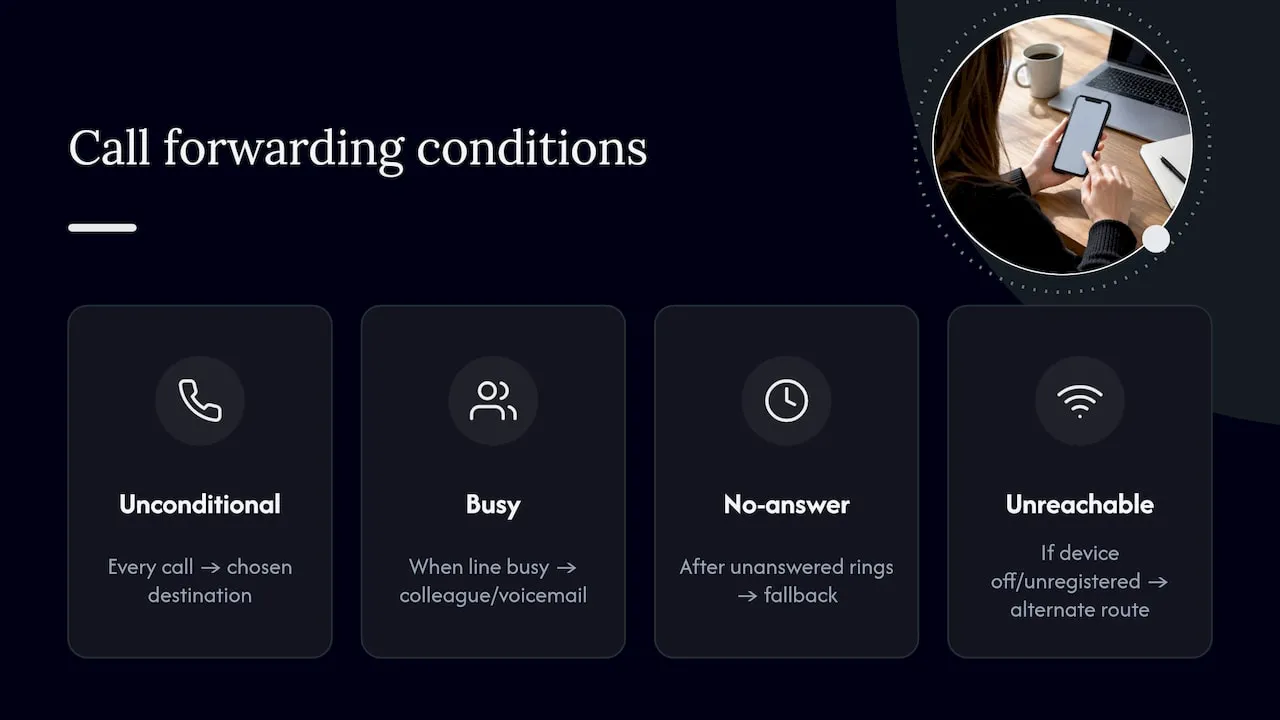
Unconditional forwarding sends every single call to the chosen destination with no exceptions, useful if a line is being fully retired or a staff member is covering someone else’s calls entirely for a period.
Busy forwarding only activates when the line is already engaged on another call, letting a second incoming call fall through to a colleague or voicemail rather than getting an engaged tone.
No-answer forwarding triggers after a set number of unanswered rings, typically used to catch calls when someone’s away from their desk without redirecting everything permanently.
Unreachable forwarding covers situations where the destination device is switched off, out of signal, or otherwise unregistered from the network, which matters most for mobile-based routing where signal drops are routine.
On a hosted control panel, these map closely to the “always,” “on busy” and “on no-answer” rule types covered earlier, though the labelling varies between providers. The practical takeaway: pick the condition that matches the actual failure you’re trying to solve, rather than defaulting to unconditional forwarding out of convenience, since that often hides genuine availability problems rather than fixing them.
How do you check if call forwarding is active?
On a mobile handset, dialling *#21# returns the status of unconditional forwarding, while *#61#, *#62# and *#67# check no-answer, unreachable and busy forwarding respectively, each displaying the destination number if a rule is active. These interrogation codes work on most GSM networks without changing anything, so they’re safe to run at any time.
For a hosted business number, the equivalent check happens in the provider’s control panel rather than on a phone. Log into the portal, open the number’s settings, and the active rule, including its type and destination, should display directly on screen. Most platforms also keep a call log showing where the last several calls were actually routed, which is a more reliable check than the rule display alone, since it confirms the setting is genuinely working rather than just saved.
If you manage several memorable numbers across a small team, it’s worth checking each one individually rather than assuming a bulk setting applied uniformly, since providers sometimes let different numbers carry different rules even under the same account.
Do forwarding codes work the same across every carrier and phone?
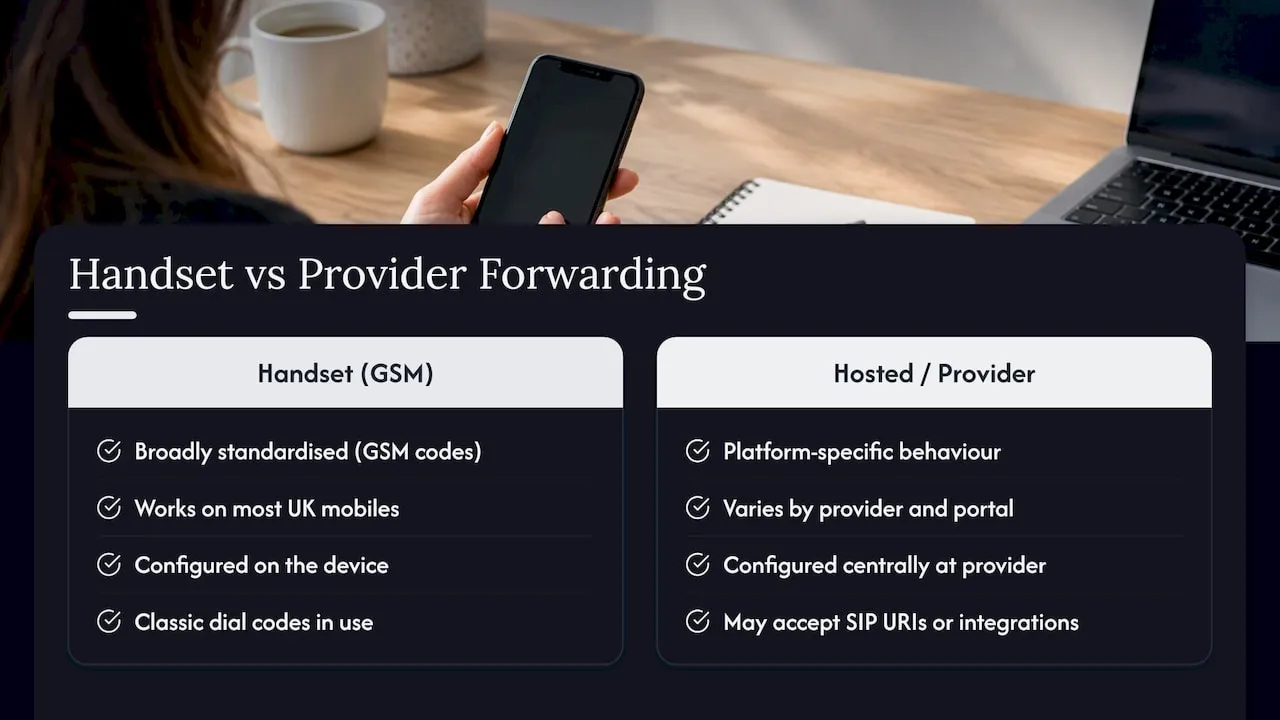
Handset GSM codes are broadly standardised, but not universally consistent. *21*, *61*, *62* and *67* work across the vast majority of UK mobile networks and most Android and iPhone handsets, since they follow the same GSM standard. Some VoIP apps and business mobile plans, however, implement forwarding through their own in-app settings rather than supporting the classic dial codes at all, and a small number of MVNOs restrict or disable them entirely.
For hosted or virtual business numbers, compatibility concerns look different. The relevant variable isn’t the handset, it’s the provider’s platform. Two providers offering broadly similar forwarding features can have completely different portal layouts, terminology, and destination-format requirements. One might accept a SIP URI directly in the same field as a mobile number; another might require SIP endpoints to be configured through a separate integration. This is precisely why hosted platforms like BT Wholesale’s WHC Express document their forwarding, hunt-group and out-of-hours features in detail, since the feature set is platform-specific rather than governed by a universal standard the way handset dial codes are.
If your team uses a mix of company mobiles, personal devices and VoIP handsets, the safest approach is to configure forwarding centrally at the provider level for the business number, and treat any handset-level codes as a separate, personal-device concern that shouldn’t be relied on for business call routing.
What are the costs and limits of using forwarding codes?
Handset-level GSM forwarding codes themselves are typically free to activate, but the forwarded call often incurs a charge from your mobile network as if you’d dialled the destination number yourself, so forwarding a UK mobile to another UK mobile can quietly rack up minutes you didn’t budget for.
Hosted or virtual number forwarding tends to work differently, and the costs are usually bundled or metered through your provider’s plan rather than charged per forwarded minute on top. That’s a meaningful difference for a business handling any real call volume, since unpredictable per-minute forwarding charges on a busy customer line can add up fast.
There are technical limits too. Handset codes generally support only one active rule per condition type at a time, and chaining forwards (a call forwarded to a number that’s itself forwarding) can fail or loop on some networks. Hosted platforms are usually more flexible, supporting hunt groups and multiple simultaneous rule types, but they depend entirely on the provider’s own feature set and any minute allowances included in the plan.
Wholesale call termination charges, the fees networks charge each other to complete a call, also remain under regulatory caps through 2031 under Ofcom’s review of call termination markets, which keeps the underlying cost of carrying forwarded traffic relatively stable regardless of which provider you use.
Why CLI settings matter more than the routing rule itself
The technical setup of a forwarding rule is the easy part. What trips businesses up is the presentation number, whether the person answering sees the caller’s real number or your business line, and that choice has knock-on effects most owners don’t think through until a customer complains about a missed callback.
My honest view: too many SMEs configure forwarding once, get it working, and never revisit the CLI presentation setting again. If staff mobiles show the original caller’s number instead of the business number, any attempted callback bypasses your business line entirely and lands on a personal device, sometimes weeks after the original call. That’s not a compliance failure, but it is a customer experience one, and it’s avoidable with a five-minute check in the control panel.
Before switching live traffic onto a new number or provider, test with a small volume first rather than pointing every incoming call at the new rule immediately. Phonenumbers’ searchable number database and step guides are there if you’re choosing a new memorable number and want to see forwarding options before you commit.
— Rob
Get a memorable number with forwarding built in from day one
Choosing the right routing rule matters less if the number underneath it isn’t memorable enough to generate calls in the first place. Some providers sell and rent memorable 01, 02 and 07 numbers that come provisioned for forwarding, so you’re not bolting routing onto a number that was never designed for it.
For businesses wanting a full hosted setup rather than just a forwarding rule on an existing line, the XL Premier Service gives you a managed hosted number from £9.60 a month, with a £14.40 one-off set-up fee. If your team needs an actual VoIP handset alongside the number, the XL Hosted Voice Service (XLHV) bundles a VoIP phone with the service from £7.86 a month, plus a £30 one-off set-up charge, so staff can answer forwarded calls on dedicated hardware rather than a personal mobile.
Search for your number and check availability on the number search and reservation page, where a 30-day reservation is available for a fee if you need time to finalise your setup before committing.
FAQ
What is the code of call forwarding on a hosted business number?
There isn’t a dial code. It’s a routing rule you set in your provider’s control panel, pointing calls to a mobile, landline, or SIP endpoint. Phonenumbers configures this at the account level when you set up a memorable number through its hosted services.
What is *72 on my phone?
UK mobiles typically use *21*, *61*, *62* and *67* for unconditional, no-answer, unreachable and busy forwarding respectively.
What is call divert and how does it differ from forwarding?
“Call divert” and “call forwarding” describe the same function; UK networks and handset menus commonly use “divert” while international standards documents use “forwarding.” Both redirect an incoming call to a different destination number.
Does forwarding cost extra on a hosted number?
It depends on the provider’s plan rather than a flat per-call charge in most cases. Phonenumbers’ plans, such as the XL-IP service from £8 a month, include bundled minute allowances rather than charging per forwarded minute.
Can I forward calls from my hosted number to more than one staff mobile?
Yes, most hosted platforms support hunt groups, ringing several destinations in sequence or simultaneously until someone answers. This is configured in the same control panel as a standard single-destination forwarding rule.
