
The clearest way to write a business number with an extension is to place the extension straight after the main number on the same line: a phone number with extension, for example +44 20 1234 5678 ext. 203. Shorthand versions like x203 or #203 work too, especially in informal contexts. For dialling, save the contact with a comma (short pause) or semicolon (wait) before the extension digits, and your phone will handle the rest automatically.
TL;DR:
- Using “ext.” immediately after the main number on the same line is the standard format, with the extension sometimes replaced by “x” or “#” depending on context.
- When dialing, insert a comma for an automatic pause or a semicolon for manual confirmation before entering extension digits, supported natively on iPhone and Android.
- Save contacts with a comma for automatic extension dialling, and test them to ensure the timing matches the PBX system’s response times, especially for international calls.
- Prefer using a direct dial-in number over a main number plus extension for faster, more reliable connection and cleaner appearance on business cards.
- Extension formats and conventions differ by country and provider, necessitating customized pauses and notation to ensure correct dialing across systems.
Table of Contents
- Phone number with extension format: examples and conventions
- How to dial an extension on a smartphone or landline
- Saving contacts so the extension dials itself
- DDI or main number plus extension: which should you save?
- Extension notation and dialling habits vary by country and provider
- Including extensions in text messages and messaging apps
- Getting the format right, every time
- Sources
- FAQ
Phone number with extension format: examples and conventions
The ITU‑T E.123 notation for telephone numbers is the closest thing telecoms has to a style guide. It recommends writing the extension immediately after the main number, on the same line, using the abbreviation “ext.” The logic is simple: keep the public number and the internal extension visually distinct, so nobody dials the extension digits as though they belonged to the main line. That distinction matters because E.123 also stresses separating public numbering from internal codes to avoid exactly this confusion.
Here’s what that looks like in practice, across a few common formats:
- International: +44 20 1234 5678 ext. 876
- UK national: 0123 456 7890 ext. 203
- US style: 1-800-555-1234 ext. 205
Shorthand alternatives exist for good reason. “Ext.” reads as formal and belongs on a business card or in a legal contract. The letter “x” (as in 1-800-555-1234 x205) is faster to type and common in email signatures and internal directories, and the hash symbol (#205) turns up mostly in dial prompts and text-based directories rather than printed material.
For a UK business card or email signature, stick with the fuller “ext.” notation. It reads as more professional and matches the standard phone prefix conventions most UK companies already use for their published numbers. Keep a single space before “ext.” and never bury the extension mid-number. If you’re updating stationery or a signature block, it’s worth reviewing your full contact presentation at the same time, since a scruffy number format undermines an otherwise polished signature.
How to dial an extension on a smartphone or landline
Dialling into a business extension usually follows the same three-step rhythm, whether you’re on a mobile, a landline, or a softphone app.
- Call the main number and wait for the automated attendant or receptionist to answer.
- Listen for the prompt. Most systems ask you to “enter the extension now” or press a specific key first.
- Type the extension digits, then wait for the transfer to complete.
That works fine when you’re dialling manually and have time to listen. It falls apart when you’re driving, multitasking, or calling from a saved contact that fires off the whole number in one go before the automated system has even finished its greeting.
That’s where pause and wait characters earn their keep. On most Android and iPhone diallers, a comma inserts a short automatic pause, and a semicolon forces a manual prompt asking you to confirm before it sends the extension digits. Written out, the two look like this:
- Automatic pause: +44 800 123 4567, followed by extension 203
- Manual wait: +1-800-555-1234; followed by extension 205
To add either character, open the dial pad, type the main number, then press and hold the * key (this usually cycles to a comma) or the # key (which typically produces a semicolon), depending on your device. Both iOS and Android support this natively, so you don’t need a separate app.
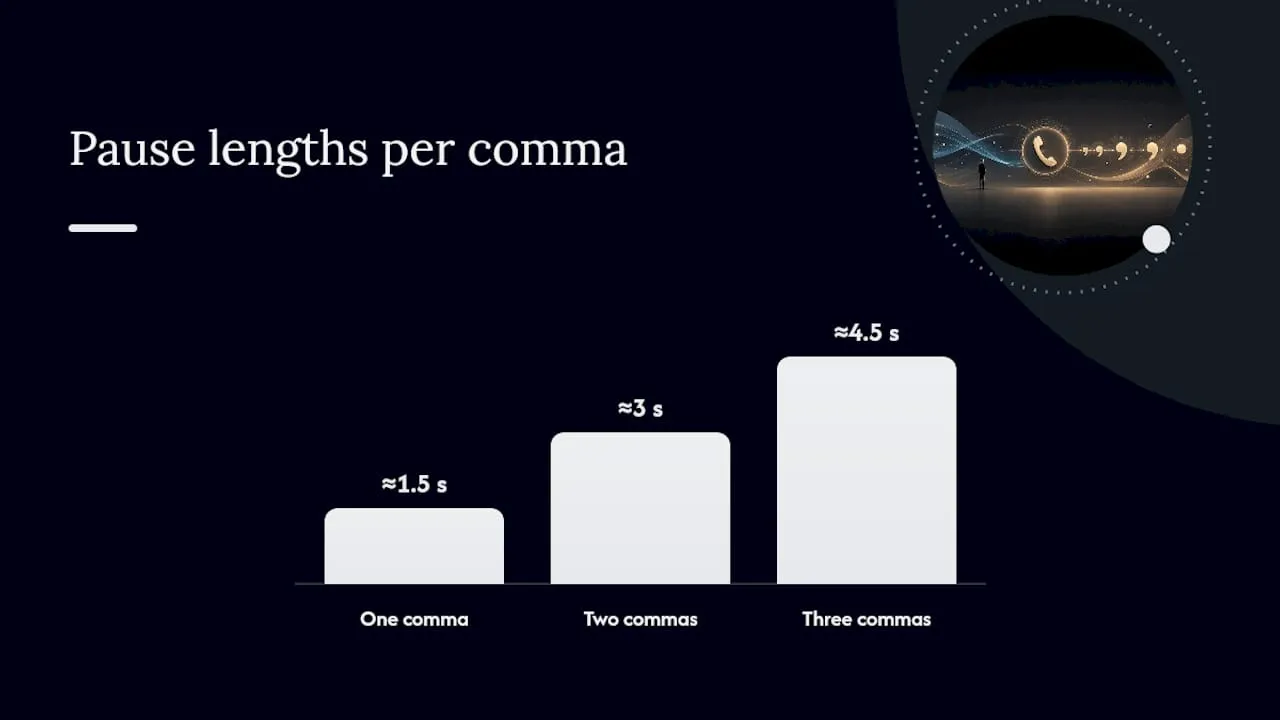
Pro Tip: If the extension doesn’t connect on the first attempt, add a second comma rather than assuming the number is wrong. A single pause is often around one to two seconds, and some PBX systems need longer to finish their greeting before they’re ready to accept digits.
If a system has a recorded message followed by a second menu, stack multiple commas, as in 08001234567,203, to buy extra time before the extension digits fire, a pattern telephony providers use for exactly this reason. If you’re never sure how long a particular company’s system takes to respond, switch to a semicolon instead, so you control the exact moment the digits get sent.
Saving contacts so the extension dials itself
Once you know a number works, save it properly so you never have to think about it again. On both iPhone and Android, the process is nearly identical: open the contact, tap the number field, and insert a comma or semicolon by long-pressing the * or # key on the in-app keypad, then type the extension digits afterwards.
The choice between the two characters isn’t arbitrary. A comma triggers automatically, sending the digits after a fixed pause with no input from you. A semicolon pauses the call and waits for you to tap “Dial” or “Send” manually, which is useful when a PBX prompt varies in length or asks a question first (such as “for sales, press 1”).
A few habits make saved contacts far more useful for teams sharing a directory:
- Name the contact with the extension and role included, for example “Anna, Sales (ext 203)”, so anyone scrolling the list knows exactly who they’re calling.
- Use double commas for numbers with a longer automated greeting: +44 20 1234 5678,203.
- Test the saved number once after entering it, since PBX response times vary enough that one pause won’t suit every system.
Getting this right once, at the point of saving, saves a repeated round of guesswork every time someone on the team needs to reach that same desk.
DDI or main number plus extension: which should you save?
A direct dial‑in (DDI) is a full phone number that rings one specific person or desk without going through a switchboard at all. A PBX extension, by contrast, is an internal short code that only means something once you’ve already reached the company’s central phone system). Call a DDI and it rings straight through. Call a main number plus extension and you’re relying on the PBX to route you correctly, which adds a step and a small chance of error.
Where a DDI is published, use it. It’s more reliable for external and international callers, avoids automated menus entirely, and looks cleaner on a business card: “+44 113 496 0203” reads better than “+44 113 496 0000 ext. 203” and gets the same person on the line, usually faster.
- Save a DDI as the primary number whenever a contact provides one.
- Fall back to main number plus extension only when no DDI exists.
- On a business card or signature, list the DDI first and the switchboard number second, if you include it at all.
Practitioners generally recommend defaulting to the DDI wherever one is available, precisely because it removes the PBX from the equation entirely.
Extension notation and dialling habits vary by country and provider
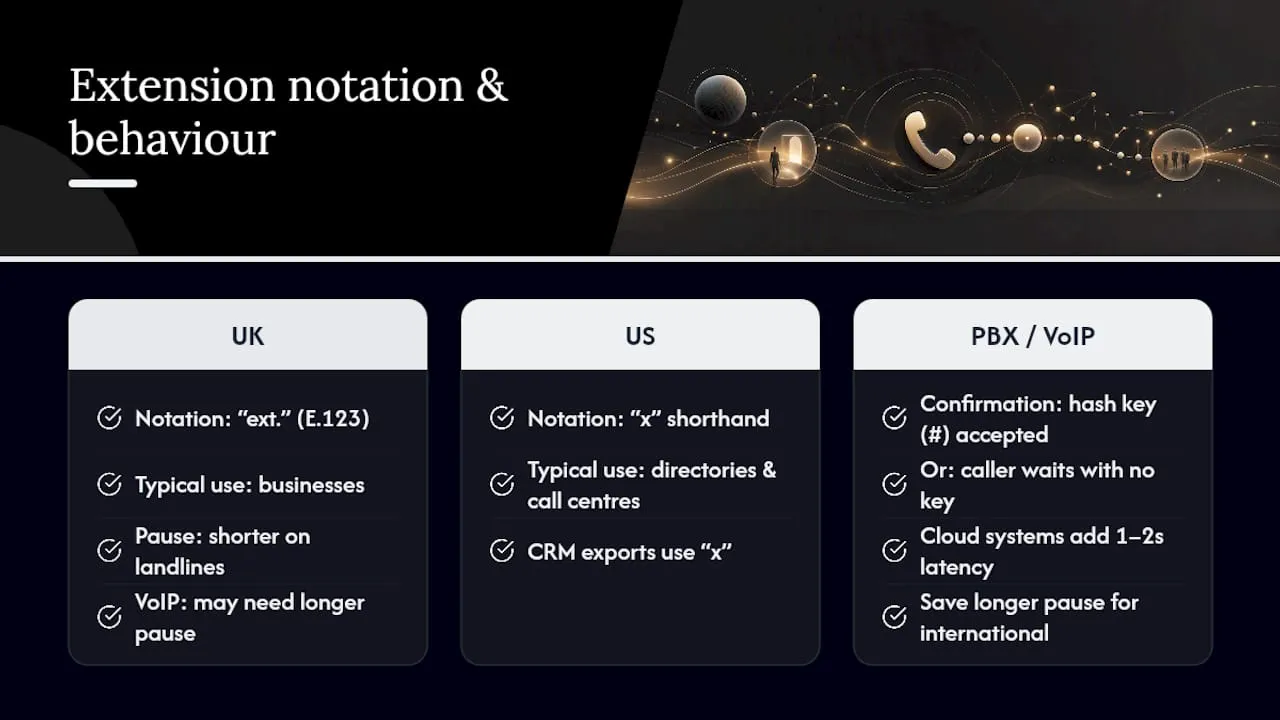
Extension formatting isn’t universal, and assuming your local convention travels well is a common mistake. UK businesses tend to favour “ext.” with a full stop, following the E.123 pattern, while US directories lean more heavily on the shorthand “x” (1-800-555-1234 x205), particularly in call centre scripts and CRM exports.
Telecom providers differ too, not just countries. Some PBX platforms accept a hash key (#) to confirm an extension entry, while others expect the caller to simply wait after dialling the digits, with no confirmation key at all. VoIP and virtual phone systems, increasingly common among small UK businesses, often route calls through software-based auto-attendants that behave more like international call centres than traditional landlines. That means the pause timing that works on a copper landline can be too short for a cloud-hosted PBX, which sometimes takes an extra second or two to load its menu.
If you regularly call the same organisation abroad, it’s worth saving that specific contact with a slightly longer pause than you’d use domestically, purely because international routing and cloud-based systems tend to add latency before the extension prompt becomes active. There’s no single fix that works everywhere. The safest approach is to treat every new saved number as a small test: dial it once, note whether the pause was too short or too long, and adjust the punctuation in the saved contact accordingly.
Including extensions in text messages and messaging apps
SMS and messaging apps like WhatsApp or iMessage don’t dial anything, so pause and wait characters serve no function there. When you’re sending a number by text, the written convention matters more than ever, because the recipient has to read and interpret it correctly before they even pick up a phone.
Stick to the same E.123‑style format you’d use on paper: “+44 20 1234 5678 ext. 203” rather than a dial string with commas or semicolons, which look like typos or errors in a text thread. If space is tight, as it can be in a signature or a business SMS template, the shorthand “x203” is acceptable and widely understood.
One habit worth adopting: if you’re sending a number that a recipient might copy straight into their dialler, add a short note clarifying that the digits after “ext.” aren’t part of the main number, for example “Call 0113 496 0000, then ext. 203 once through to the switchboard.” It’s an extra few words, but it prevents someone from pasting the whole string into a dial pad and wondering why the call fails. Messaging apps that support tappable phone numbers will sometimes auto-link only the main digits and ignore the extension entirely, so a written instruction alongside the number is often more reliable than relying on the link to carry the full detail.
Getting the format right, every time
There’s one format worth committing to memory: extension after the main number, on the same line, using “ext.” followed by the digits, in line with the ITU‑T E.123 standard. For saved contacts, a comma before the extension handles most automated systems without any thought required afterwards.
Copy this checklist into your signature template or business card brief:
- Write the number as +[country code] [area code] [number] ext. [digits], with no extra punctuation.
- Save the contact with a comma before the extension, switching to a semicolon only if the system needs manual confirmation.
- Use a DDI instead of main number plus extension whenever one is available.
Most of the confusion around extensions comes down to people treating the written form and the dialled form as the same problem. They’re not. One is about clarity for a human reader; the other is about timing for a machine. Get both right and nobody on either end of the call has to think twice.
— Rob
Sources
- ITU‑T E.123 notation for telephone numbers
- How to automatically dial a phone extension
- How to call a PBX extension directly: full 2026 guide | Fonvirtual
FAQ
How do I write a phone number with an extension?
Put the extension straight after the main number on the same line, using “ext.” followed by the digits, for example +44 20 1234 5678 ext. 203. This follows the ITU‑T E.123 recommendation for telephone number notation.
What is a phone extension example?
A common example is 0113 496 0000 ext. 205, where 0113 496 0000 is the main switchboard number and 205 is the internal extension for a specific desk or department. Shorthand versions like x205 or #205 mean the same thing.
What does “phone number with extension” mean?
It refers to a main published number followed by a short internal code that routes the call to a specific person or team once it reaches the company’s PBX system. The main number gets you to the switchboard; the extension gets you to the right desk.
What is a 3 digit extension number?
A three‑digit extension is simply an internal code with three digits, such as 203 or 876, commonly used by small to medium‑sized businesses whose PBX system doesn’t need a longer code to cover every extension. Larger organisations sometimes use four or five digits instead.
