
TL;DR:
- Driver contact management involves standardizing data, storing it securely, and maintaining accurate records through regular audits. Using centralized virtual numbers and clear communication protocols helps protect driver privacy and ensures operational consistency. Regular data reviews and proper formatting minimize errors and streamline fleet communication.
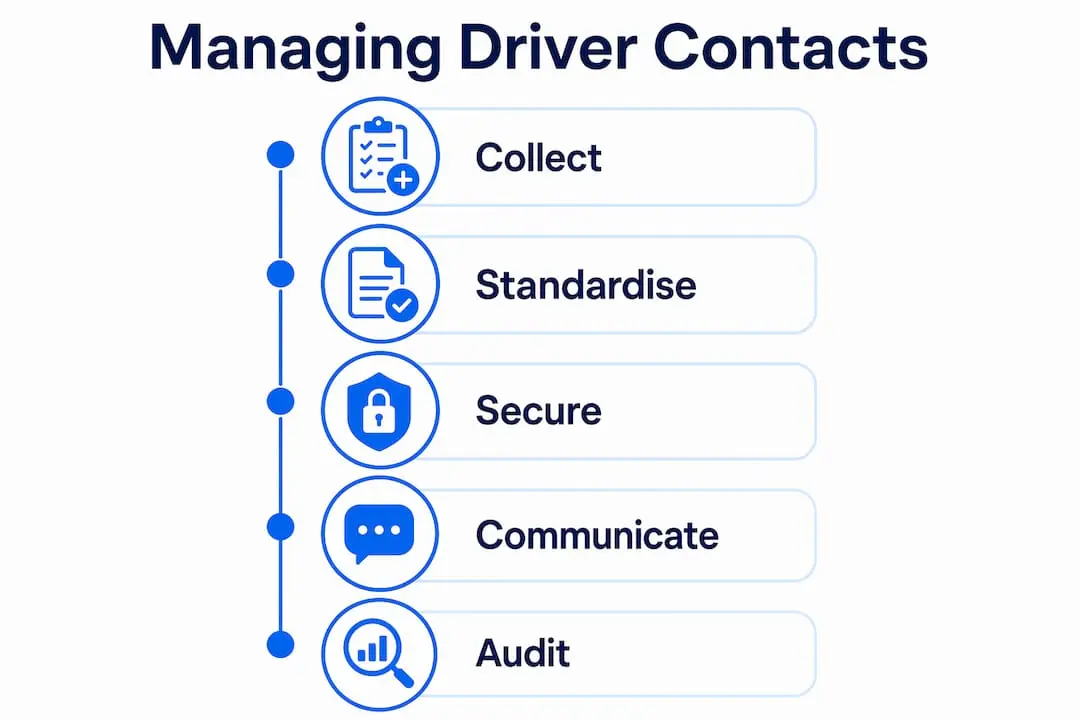
Driver contact number management is the process of collecting, storing, formatting, and maintaining accurate phone records for every driver in your fleet. Done well, it cuts missed calls, protects driver privacy, and keeps your dispatch operation running without gaps. Done poorly, it causes delays, data breaches, and drivers who are simply unreachable when you need them most. This guide covers the tools, data standards, and communication protocols UK fleet managers need to get it right in 2026.
How to manage driver contact numbers: prerequisites and tools
The foundation of any working driver directory is data standardisation. Phone numbers should be standardised in E.164 format and consent documented before you import any contact into a CRM or fleet management system. E.164 is the international standard that formats numbers as +447911123456, removing ambiguity about country codes and dialling prefixes. Without it, your system may store the same number three different ways, creating duplicates and calling errors.
Software choice matters as much as formatting. The main options for UK fleets are:
- Dedicated fleet management platforms such as Samsara or Verizon Connect, which combine driver records with telematics data
- General CRM systems such as HubSpot or Zoho CRM, which offer flexible contact fields and tagging
- Custom low-code apps, which typically take 6–12 weeks to build using platforms like Bubble and are suited to fleets with unusual workflows
- Spreadsheets such as Microsoft Excel or Google Sheets, which work for very small fleets but lack access controls and audit trails
| Tool type | Best for | Key limitation |
|---|---|---|
| Fleet management platform | Mid to large fleets needing telematics | Higher cost |
| CRM system | Fleets prioritising communication logs | Requires configuration |
| Low-code custom app | Unique operational workflows | Build time required |
| Spreadsheet | Fleets with fewer than 10 drivers | No access controls |
Legal compliance is non-negotiable. Under UK GDPR and the Data Protection Act 2018, you must have a lawful basis for storing driver contact data and a documented record of consent for any marketing or non-operational communications. Review your consent records whenever regulations are updated, and store them alongside the contact data they relate to.
Pro Tip: Before importing any contacts, create a data mapping document that matches your existing fields (name, mobile, licence number) to the fields in your new system. This prevents mismatched data and saves hours of cleanup.
How to store driver numbers securely and accessibly
Secure, accessible storage starts with one technical rule: store phone numbers as text strings, not as numeric values. Spreadsheets and some databases strip leading zeros from numbers stored as integers. A UK mobile beginning with 07 becomes 7, which is useless for dialling. Setting the field type to text preserves the format exactly as entered.
Beyond that single rule, a well-structured driver contact record should include these fields:
- Full name (surname first for sorting)
- Primary mobile number (text field, E.164 format)
- Secondary or home number (optional)
- Licence number and expiry date
- Vehicle assignment
- Tags (e.g. HGV qualified, night shift, on leave)
- Consent date and basis
Centralising communication through company or virtual numbers protects driver privacy and prevents clients from bypassing your dispatch system. When all inbound and outbound calls route through a single business number, drivers never need to share personal mobiles with customers. This also means your contact directory holds one authoritative number per driver rather than a mix of personal and work lines.
Keeping data current requires a scheduled process, not good intentions. Quarterly audits of all driver records are recommended for compliance and accuracy. Build the audit into your calendar as a fixed task. Cross-reference contact numbers against payroll records and licence renewal dates at the same time to catch any discrepancies in one pass.

Pro Tip: Create a simple verification email or text template that asks drivers to confirm their contact details are correct. Send it at the start of each quarter. Drivers respond faster when the request is brief and direct.
For guidance on managing phone numbers in the UK, the process of formatting, cleaning, and integrating driver phone data into your chosen system follows the same principles regardless of fleet size.
What are best practices for driver communications?
Clear communication protocols prevent the two most common failures: sending a text when a call was needed, and calling when a quick message would have sufficed. Use texts for routine status updates and calls for complex or urgent issues. This distinction keeps drivers focused on the road and dispatchers focused on exceptions rather than routine check-ins.
The right milestones for proactive updates are:
- Departure confirmed — driver has left the depot or previous drop
- Arrival at collection point — driver is on site and waiting
- Load confirmed — cargo secured and documentation checked
- En route to delivery — estimated arrival time shared with recipient
- Delivery complete — proof of delivery logged and driver availability updated
Proactive updates at key milestones build trust between dispatchers and drivers. They also reduce inbound calls from drivers asking what to do next, which frees up dispatch time for genuine problems.
Platforms such as MultiLine by Movius route all communications through a single business number, protecting driver privacy and reducing missed deliveries. When a driver’s personal number is never exposed to customers, the risk of client poaching drops significantly. Centralised routing also creates a full communication log that managers can review if a dispute arises.
Written records matter even when you communicate by phone. After any significant phone conversation, send a brief follow-up text or email summarising what was agreed. This creates an audit trail and removes any ambiguity about instructions given during a call.
Pro Tip: Set a rule that any change to a delivery instruction must be confirmed in writing within five minutes of the call ending. A single sentence is enough. This protects both the driver and the business.
Managing taxi phone lines effectively follows the same communication discipline: one authoritative number, clear escalation rules, and written confirmation of verbal instructions.
How to maintain accuracy and compliance over time
Accuracy degrades faster than most fleet managers expect. Drivers move house, change numbers, leave the company, or take extended leave. A contact directory that was accurate in january may have several errors by april without a maintenance process in place.
The core maintenance tasks and their benefits are:
| Task | Frequency | Benefit |
|---|---|---|
| Driver contact verification | Quarterly | Catches number changes before they cause failures |
| Licence and document check | Quarterly | Combines compliance and contact audit in one pass |
| Consent record review | Annually or on regulation change | Maintains UK GDPR compliance |
| Duplicate record check | Quarterly | Prevents calling errors from duplicate entries |
| System access review | Bi-annually | Removes access for staff who have left |
Continuous engagement with drivers, including refresher training and small group meetings, keeps communication policies effective beyond their initial rollout. A policy that staff read once and then forget is not a policy. Schedule short briefings when you update your contact management process, and confirm understanding in writing.
Automation reduces the manual burden of maintenance. Most CRM systems and fleet platforms allow you to set reminder triggers. Configure alerts for licence expiry dates, consent renewal windows, and drivers who have not had their records verified within the audit period. The system flags the issue; your team resolves it.
Integrating your contact directory with bookings, payroll, and route planning systems removes the need to update multiple records when a driver’s details change. A single update in the master record propagates across all connected systems. This is the single biggest efficiency gain available to fleets that currently manage contacts in separate spreadsheets.
What common challenges arise and how do you overcome them?
Duplicate records are the most common problem in driver contact directories. They appear when contacts are imported from multiple sources without deduplication checks, or when a driver is re-entered after a period of absence. The fix is a deduplication rule applied at import: flag any record where the mobile number already exists in the system before saving.
Other frequent challenges include:
- Inconsistent formatting: numbers entered as 07911 123456, 07911123456, and +447911123456 are the same number but will not match in a search. Enforce E.164 format at the point of entry.
- Driver privacy concerns: some drivers resist sharing personal numbers with a central system. Address this by explaining that their number is only used internally and is never shared with customers.
- Staff resistance to new tools: teams accustomed to spreadsheets often push back on CRM adoption. Run a short pilot with one team before rolling out to the whole fleet.
- Communication overload: too many texts and calls cause drivers to ignore messages. Reserve direct contact for operational necessity and use broadcast messages for general updates.
“The biggest mistake fleet managers make is treating contact management as a one-time setup task. It requires the same ongoing attention as vehicle maintenance.”
Migration from spreadsheets to a CRM or fleet platform is the moment when most data problems surface. Export your spreadsheet, run a deduplication check, apply E.164 formatting, and verify consent records before importing. Attempting to clean data inside the new system after import is significantly harder than cleaning it before.
Pro Tip: Set a written policy that defines exactly when dispatchers should switch from text to voice. For example: texts for all routine updates, calls for any issue that cannot be resolved in two messages. Ambiguity here causes delays.
Key takeaways
Effective driver contact management requires standardised data, secure centralised storage, and consistent communication protocols maintained through regular audits.
| Point | Details |
|---|---|
| Standardise number format | Store all numbers in E.164 format and as text strings to prevent leading zero errors. |
| Centralise communication | Route all driver contact through a single business number to protect privacy and create audit trails. |
| Audit quarterly | Review all driver contact records every quarter to catch changes before they cause operational failures. |
| Define communication rules | Use texts for routine updates and calls for urgent or complex issues, with written confirmation after calls. |
| Integrate systems | Connect your contact directory to bookings and payroll so a single update propagates across all platforms. |
What I have learned about driver contact management after years in the field
The conventional advice is to pick a good CRM and keep it updated. That is correct but incomplete. The real problem most UK fleet managers face is not the software. It is the absence of a culture that treats contact data as a live operational asset rather than a static list.
I have seen fleets invest in excellent platforms and still end up with outdated records because no one owned the maintenance task. The quarterly audit only works if someone’s job description includes running it. Assign it explicitly, not as an afterthought.
The shift I find most underrated is moving from personal driver numbers to centralised virtual numbers. Fleets that make this change report an immediate reduction in the informal side-channels that develop when customers have direct access to drivers. Those side-channels are where client poaching happens and where instructions get lost. A memorable business number that customers recognise and trust is also a commercial asset, not just an operational tool.
Low-code platforms are genuinely changing what small fleets can build without a development budget. A custom driver management app that fits your exact workflow, built in 6–12 weeks, is now realistic for businesses that previously had no option beyond spreadsheets. The barrier is not cost or time. It is knowing that the option exists.
My honest advice: start with the data. Clean it, format it, and centralise it before you evaluate any new software. Every tool works better with accurate input.
— Rob
Give your fleet a number worth remembering
Every communication system in your fleet depends on one thing: a number that drivers, dispatchers, and customers can reach reliably. Phonenumbers is the UK’s leading provider of memorable 01, 02, and 07 numbers, and no number is tied to a local area, so you can use any number anywhere in the country. Whether you need a single dispatch line or a set of numbers for different regions, you can search the full database by number sequence, area code, or town to find the right fit. For a fleet-ready option with instant recognition, take a look at 0113 307 0707 or 0115 928 8888. A number your drivers and customers remember is one fewer thing that goes wrong on a busy shift.
FAQ
What format should I use to store driver phone numbers?
Store all driver phone numbers as text strings in E.164 format (for example, +447911123456). This preserves leading zeros and prevents dialling errors in CRM systems and spreadsheets.
How often should I audit driver contact records?
Quarterly audits are the recommended standard for fleet driver records. Combine the contact check with licence verification to complete both compliance tasks in a single pass.
How do I protect driver privacy when managing contact numbers?
Route all communications through a centralised company or virtual number rather than exposing drivers’ personal mobiles to customers. This prevents client poaching and keeps your contact directory authoritative.
When should I use texts versus calls to contact drivers?
Use texts for routine status updates such as departure confirmations and delivery completions. Switch to a voice call for any urgent issue or complex instruction that cannot be resolved in two messages.
What is the biggest risk when migrating from spreadsheets to a CRM?
Duplicate and inconsistently formatted records are the primary risk. Deduplicate and apply E.164 formatting to your spreadsheet data before importing, not after, to avoid compounding errors inside the new system.