
Write a UK mobile in national form as 07xxx xxxxxx (for example 07700 900123), or in international form as +44 7xxx xxxxxx (+44 7700 900123), dropping the leading 0. The mistake that breaks calls and texts more often than any other is writing +44 07700 900123. Once you add the +44, the 0 has to go.
TL;DR:
- Writing +44 with the leading zero included (such as +44 07700 900123) renders the number invalid, causing most international connection failures.
- Use the international format by replacing the leading zero with +44, resulting in +44 7700 900123, for proper international dialing.
- For UK domestic use, display numbers in the 07700 900123 format with a space after the fifth digit to ensure clarity and consistency.
- Avoid mixing country codes and trunk prefixes; common errors like leaving the zero after +44 are the main cause of failed calls and texts.
Table of Contents
- How do you write a UK mobile number for national use?
- How do you write a UK mobile number with the country code?
- What’s the right way to display a phone number on a website or form?
- What is the correct storage format for UK mobile numbers?
- What mistakes cause calls and texts to fail?
- Worked examples you can copy directly
- A practical view from someone who deals with UK numbers daily
- Sources
- FAQ
How do you write a UK mobile number for national use?
UK mobile numbers always start with 07 in national format, and the full number runs to 11 digits including that leading zero. Every legitimate mobile prefix, from 07700 to 07999, sits inside the range Ofcom allocates and tracks through its national numbering scheme.
The readable convention splits the digits 5 and 6: 07700 900123, not 077009 00123 or any other grouping. That gap after the fifth digit is what makes a string of eleven numbers scannable rather than a wall of digits.
Use national format when:
- Your audience is entirely UK-based (adverts, shop signage, local flyers).
- You’re printing on materials where space is tight and a country code adds clutter.
- The number appears alongside other domestic contact details, such as a landline or postal address.
National format is the default for most day-to-day British communication. It only becomes wrong once someone outside the UK needs to dial the number.
How do you write a UK mobile number with the country code?
Swap the leading 0 for +44 and nothing else changes: 07700 900123 becomes +44 7700 900123. That single substitution is the entire rule, yet it’s the one step people get wrong constantly.
The plus sign works differently depending on what’s dialling. On a mobile handset, “+” automatically substitutes whatever international exit code the local network needs, so +44 dials correctly from a phone in Sydney, Toronto, or Berlin without the caller doing anything extra, according to Revolut’s guide to the +44 calling code. From many landlines, though, that automatic substitution doesn’t happen, and the caller needs to dial 00 first, followed by 44 and the number minus its 0. That’s why you’ll sometimes see UK numbers written as 0044 7700 900123 for landline-heavy audiences.
One error causes most failed international calls and texts to UK mobiles: leaving the 0 in after adding +44. Writing +44 07700 900123 is not a stylistic quirk. It’s a broken number, because +44 already replaces that 0 and the network reads the extra digit as part of the subscriber number, according to engineering guidance on UK number formatting.
- +44 7700 900123 → correct.
- +44 07700 900123 → incorrect, often fails.
- 0044 7700 900123 → correct for landline dialling.
- 0044 07700 900123 → incorrect, same reason.
What’s the right way to display a phone number on a website or form?
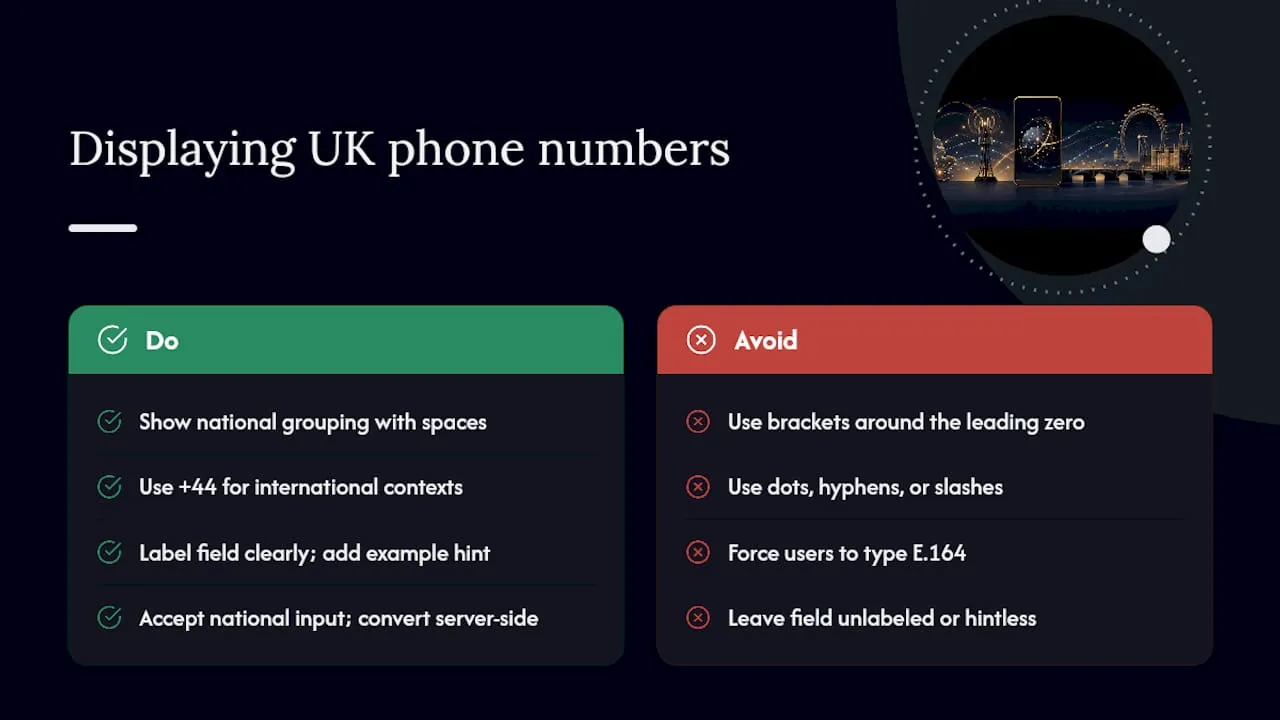
The GOV.UK Design System recommends showing mobile numbers in the readable national grouping, 07700 900000, rather than an unbroken digit string or an over-punctuated mess. Readability for humans and machine parsing are different jobs. Spaces help the former; they mean nothing to the latter.
Skip formats like +44 (0)7700 900123. Brackets around a zero that shouldn’t be dialled at all confuse more than they clarify, and that convention belongs to landline numbers with area codes, not mobiles. Keep punctuation to spaces only. No dots, no hyphens, no slashes.
For business cards, invoices, and website footers, show whichever format matches your primary audience. A UK-focused invoice shows the national form; an international order confirmation shows +44. Phonenumbers’ checklist for presenting numbers clearly across small business touchpoints covers this consistency issue in more depth.
On web forms, label the field plainly and give hint text such as “include the country code, e.g. +44 7700 900000” rather than leaving users to guess.
Pro Tip: If your backend needs E.164, don’t force the user to type it that way. Accept the national format they know, then convert it silently before storage.
What is the correct storage format for UK mobile numbers?
E.164 is the canonical, digits-only form used for storage: +447700900123, no spaces, no brackets, country code and subscriber number run together. It’s the format APIs, CRMs, and telephony platforms expect, because it removes every ambiguity a human-readable version introduces.
The practical workflow looks like this:
- Accept whatever format the user types, spaces, hyphens, brackets and all.
- Strip everything except digits and a leading plus sign, converting a leading 00 to +.
- Normalise the result to E.164 for storage: +447700900123.
- When displaying the number back to a UK user, render the national form, 07700 900123, not the raw E.164 string.
Don’t build a custom regular expression to validate this. Ofcom’s numbering plan carries enough legacy ranges and reserved blocks that a homemade pattern will misfire on edge cases you haven’t tested for. The standard advice among developers is to use libphonenumber, or its JavaScript port libphonenumber-js, which Google maintains and which already accounts for those exceptions.
Store the number in E.164. Display it in national format to the person reading it. Two formats, one source of truth, and no confusion between the two.
What mistakes cause calls and texts to fail?
Four errors account for almost every broken UK mobile number in the wild:
- Leaving the 0 after +44 — the single most common fault, and the one that turns a working number into a dead one.
- Placeholder digits left over from a template, like +44 7xxx xxxxxx copied straight from a guide.
- Extra or missing digits, usually from manual retyping rather than copy and paste.
- Wrong country code entirely, mixing up +44 with +1 or +353 when a form auto-fills the wrong default.
Before publishing or storing any number, run three quick checks: convert any leading 00 to a plus sign, strip every character that isn’t a digit (keeping a leading + if present), then confirm the remaining subscriber number is 10 digits once the UK trunk 0 is removed.
On forms, accept the plus sign as valid input, normalise whatever the user types without complaint, and show them the stored format afterwards so they can catch their own typo before it costs them a missed customer call.
Worked examples you can copy directly
Here’s a mobile number and a London landline shown across every format you’re likely to need, plus the classic wrong version so you can see exactly what not to do.
That bottom row isn’t a formatting variant. Both entries keep the trunk 0 after the country code has already replaced it, which is exactly the fault that stops calls connecting and SMS delivering. The digits-only row matters for older systems and some SMS gateways that reject the plus sign outright but still need the full international number to route correctly.
A practical view from someone who deals with UK numbers daily
Businesses come to Phonenumbers asking the same question in different words: “why isn’t this number working on my website?” The answer is almost always the +44-plus-0 error, buried in a footer or a booking form nobody’s tested from a foreign SIM.
There are providers that sell and rent memorable 07 mobile and 01/02 landline numbers, searchable by sequence, area code, or town, and many of these numbers can be forwarded, paired with a SIM, or plugged into a business phone system regardless of where the business actually operates. Getting the format right matters more once a number is meant to be memorable. A striking sequence loses its impact if half your customers can’t dial it correctly from abroad.
If you’re setting up a number for a UK business today, normalise to E.164 in your systems and always show the national format to the people calling it. It’s the one habit that quietly prevents most support tickets before they happen. Browsing available memorable UK numbers is a sensible next step if your current number is either hard to remember or already causing this exact confusion.
— Rob
Sources
- Telephone numbers in the United Kingdom / Ofcom
- Phone numbers — GOV.UK Design System
- United Kingdom Country Code | Guide to +44 Calling Code for the UK | Revolut Australia
- UK phone number format — E.164, regex, rules | WhoCalledLookup
FAQ
Does +44 replace the 0 or 07?
The +44 country code replaces only the leading 0, not the 07. So 07700 900123 becomes +44 7700 900123, keeping the 7 as the first digit after the country code.
How do I write my mobile number with the UK code?
Take your national number, remove the leading 0, and add +44 in front of it: 07700 900123 becomes +44 7700 900123. Never write +44 followed by another 0.
How do I format +44 numbers for display?
Group the digits for readability, +44 7700 900123, and avoid brackets around a zero, since that convention belongs to landlines with area codes and doesn’t apply to mobiles at all.
How do I write my mobile phone number correctly?
For UK audiences, write it as 07700 900123. For international use or online forms, write +44 7700 900123, and for backend storage use the digits-only E.164 form, for example +447700900123.
