
Set up forwarding in your number provider’s dashboard, not on the handset. Log in, select the number, open the forwarding or routing settings, and enter your destination in full international format, such as +44 7700 900000. Pick unconditional or conditional forwarding, save the rule, then ring the number from another phone straight away to confirm it works.
TL;DR:
- Always set up call forwarding through your provider’s dashboard, entering the destination number in full international format starting with +44.
- Conditional forwarding is recommended for most small businesses to maintain app-based answering before calls divert to mobiles or voicemails.
- Testing immediately after saving rules on a different phone verifies that forwarding works correctly and that no common errors, like missing country codes, occur.
- Forwarding issues typically stem from incorrect number formats, staff changes, or unadjusted settings, so regular monthly checks prevent missed calls.
- Hosted number platforms and providers like XL offer dashboard control with options for flexible routing, including plans that keep your current handset or provide dedicated support.
Table of Contents
- How do you set up call forwarding step by step?
- Which forwarding type is right for your business?
- How do you test and troubleshoot call forwarding?
- What does a decade of dashboard fixes teach you about forwarding?
- Get your memorable number hosted and forwarding in one place
- Sources
- FAQ
How do you set up call forwarding step by step?
Forwarding for a hosted memorable number is configured entirely in the provider’s control panel. There are no star codes to dial and nothing to set on the handset itself, because the number lives in the cloud, not on a SIM in your pocket. The typical portal setup follows the same logical sequence across most UK providers, even when the menu names differ slightly.
- Log in and select the number. Choose the 01, 02 or 07 number you bought or rented from your account dashboard.
- Open the forwarding settings. Look for a tab called “Call Forwarding”, “Routing” or “Voice Settings” attached to that specific number.
- Enter the destination in full international format. Type the mobile, landline or SIP address you want calls to land on, always starting with +44 for a UK destination rather than the leading 0.
- Choose the forwarding type. Decide between unconditional (every call diverts immediately) or conditional (diverts only on no answer, busy or unreachable), and set a ring time of a reasonable duration before the conditional rule kicks in.
- Add time-of-day rules if you need them. Route to a desk phone during office hours and to a mobile or voicemail after hours.
- Set caller ID and call whisper preferences, then save. Decide whether the caller sees your memorable number or the destination number, and whether staff hear a short whisper announcing which line rang.
- Test from a second phone. Call the number, listen for ring behaviour, check the caller ID display, and confirm audio quality before you trust the line with real customers.
Pro Tip: Save the rule, then immediately call your own memorable number from a mobile that isn’t the forwarding destination. A rule that looks correct on screen can still fail silently if the destination number was mistyped without its country code.
Most providers let you manage several numbers from one dashboard, which matters if you’re running more than one memorable line for different services or locations. Virtual number platforms handle the routing, forwarding and call recording centrally, so changes take effect within seconds rather than requiring a callout or a wait for network propagation.
Which forwarding type is right for your business?
The type you pick depends on how many people answer your calls and how fast you need them answered.
- Unconditional forwarding sends every call straight to one destination with no exceptions. It’s the simplest rule to set up, but you lose the ability to screen or answer calls from within a softphone app, so it suits a single sole trader who only ever answers on one mobile.
- Conditional forwarding tries your primary device first and only diverts on no answer, busy, or unreachable. It’s marginally more fiddly to configure but keeps app-based answering intact, which is why it works as the recommended default for most small businesses.
- Sequential ring tries one destination, then the next, then the next. A plumber with two vans might ring the office line first, then their own mobile, then a colleague’s, in that order.
- Simultaneous ring rings every destination at once so whoever picks up first takes the call. This suits overflow situations, such as a taxi firm where any available dispatcher should grab an incoming booking.
Time-based routing lets you combine these: conditional ring to a desk phone from 9am to 5pm, then unconditional forwarding to a mobile outside those hours. For most sole traders and small teams, conditional forwarding with a moderate ring time and voicemail fallback is the safest starting point. It gives you the chance to answer properly before the call diverts anywhere else.
How do you test and troubleshoot call forwarding?
Run a live test the moment you save any new rule. Call your memorable number from a phone that isn’t the forwarding destination, and listen carefully to ring pattern, audio clarity, and what caller ID the receiving handset shows.
If the call doesn’t forward at all, work through these checks in order:
- Destination format. Confirm the number was entered as +44 followed by the number without the leading zero, since a missing country code is one of the most common causes of silent failure.
- Account and plan coverage. Check the number still has active credit or minutes allocated, particularly on pay-as-you-go hosting plans.
- Destination reachability. Make sure the receiving mobile or landline is switched on, in signal, and not already engaged on another call.
- Voicemail interception. Decide upfront whether the provider’s voicemail or the destination device’s voicemail should pick up unanswered calls, and disable whichever one you don’t want answering, so callers aren’t dropped into the wrong mailbox.
- Forwarding loops. Never point a forwarding rule at a destination that itself forwards back to the original hosted number, since that creates a loop that either drops the call or rings forever.
- Billing surprises. Forwarding to an international destination or via certain SIP routes can trigger two-leg billing, where you’re charged for both the inbound leg and the forwarded leg, so check your provider’s pricing before enabling forwarding abroad.
A quick monthly check, calling the number and confirming it still routes correctly, catches problems caused by staff changes or accidental setting edits before a customer ever notices. Many dashboards also log call analytics, which is worth glancing at periodically to spot missed calls or unusual patterns early.
What does a decade of dashboard fixes teach you about forwarding?
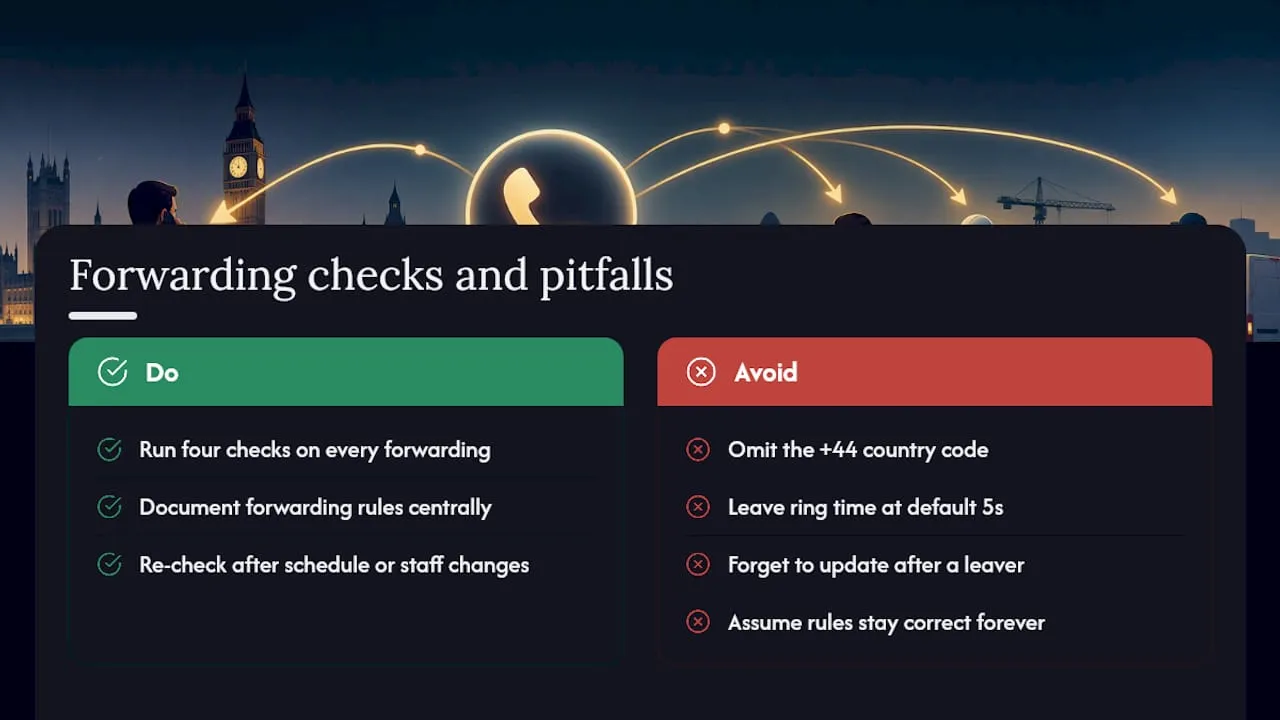
Most forwarding problems that land on my desk aren’t exotic. They’re a missing +44, a ring time left at the provider’s default of five seconds so calls skip straight to voicemail, or nobody remembering to update the rule after a member of staff left. Run through the same four checks every time: destination format, ring time, voicemail behaviour, and whether the billing looks right after the first month.
The bit people underestimate is portability. A memorable number isn’t tied to a location or even to one provider’s network, so it can be hosted and routed anywhere in the UK, or beyond. That flexibility only holds up if someone documents the forwarding rules and checks them after every schedule or staffing change, rather than assuming they’ll stay correct forever.
— Rob
Get your memorable number hosted and forwarding in one place
Some providers sell and rent memorable UK landline and mobile numbers, often including dashboard control over forwarding, so you’re not stuck relying on handset settings that break when you swap devices. That’s the practical difference for a sole trader or small team: one login, one set of rules, and a number that keeps working the same way whichever phone you’re carrying that week.
If you want a fully hosted line with a proper handset, the XL Hosted Voice Service (XLHV) pairs a VoIP phone with dashboard forwarding for £7.86 a month. Prefer to keep using your existing broadband and phone? XL-IP lets you keep your current handset and route through your router from £8 a month, with call bundles from £3.50 a month for 250 minutes to 01/02/03 and top mobile networks. Businesses that want dedicated hosting and support can look at the XL Premier Service from £9.60 a month. Not got a number yet? Search available memorable numbers and reserve one before you set up a single forwarding rule.
Sources
For deeper detail beyond this checklist, see the remote call forwarding guide for UK firms, the business voicemail setup guide, and the call forwarding checklist for business owners for a printable verification list.
- 5 business benefits of investing in virtual landline numbers
- How to Configure Call Forwarding for a Virtual Number (2026) | gosimless
- Virtual Phone Number Call Forwarding: Setup Guide : DIDforSale
FAQ
Can I set up call forwarding without a provider account?
No. Forwarding for a hosted memorable number is configured entirely through the provider’s control panel, not through handset star codes or carrier settings. You need an active account for the number before any forwarding rule can be created.
What’s the correct format for a UK forwarding destination?
Always use the full international format, starting with +44 and dropping the leading zero from the local number, for example +44 7700 900000. Entering the number with a leading 0 instead of +44 is one of the most frequent causes of forwarding failure.
Should I use conditional or unconditional forwarding?
Conditional forwarding, which only diverts on no answer, busy or unreachable, suits most small businesses because it keeps app-based answering available before falling back to a mobile. Unconditional forwarding is simpler but sends every call straight to one destination with no chance to answer via the provider’s app first, as outlined in this forwarding setup guide.
Does forwarding a number affect my call charges?
It can. Forwarding to an international destination, or through certain routes, may trigger two-leg billing where both the inbound and forwarded legs are charged, so check your provider’s pricing before forwarding abroad.
Does Phonenumbers offer numbers with forwarding included?
Yes. Every memorable number bought or rented through Phonenumbers includes dashboard access for forwarding, with current pricing for hosted options such as XL Hosted Voice and XL-IP listed on the site.
