
Call forward means a phone feature that automatically redirects an incoming call from the number you dialled to another destination, such as a mobile, a landline or a VoIP line. Forwarding can be set to catch every call (unconditional) or only certain ones, such as when the line is busy or unanswered (conditional). Because the network treats the redirected call as a separate outgoing connection, the person who set up forwarding is usually the one billed for that leg.
TL;DR:
- The account holder usually pays for the separate outgoing leg, even though callers hear a normal connection and may not realize forwarding is active.
- No answer forwarding commonly waits about 15 seconds on landlines, while some cloud systems allow delays as short as five seconds; provider settings vary.
- For UK setups, enter the destination in standard format beginning with 0, not +44; hosted VoIP systems usually use a portal instead of keypad codes.
- Forwarding can redirect voicemail and interrupt recording on the original line; test a call, then check both inboxes and recording logs.
- Caller ID cannot verify identity, even when a forwarded call appears to come from a bank; hang up and call back using a trusted number.
Table of Contents
- Call forwarding, call divert and the terms worth knowing
- Types of call forwarding and when each one kicks in
- How forwarding actually works and why it affects your bill
- How to set up or cancel call forwarding on your phone
- When forwarding earns its place and what it’s good for
- Why a forwarded call is no proof of who’s calling, and what to do about it
- Getting UK forwarding set up correctly the first time
- What happens to voicemail and call recording when calls are forwarded
- Does forwarding affect your ability to keep a memorable number?
- Fixing the most common call forwarding problems
- Landline forwarding versus VoIP forwarding
- How forwarding fits alongside simultaneous ring and hunt groups
- Why forwarding still matters
- Memorable numbers with forwarding built in
- FAQ
- Sources
Call forwarding, call divert and the terms worth knowing
“Call forward” and “call divert” describe the same thing. In the UK, “divert” is the more common everyday word, while “forward” turns up more in American English and in software settings menus. Either way, the mechanic is identical: calls aimed at one number get rerouted somewhere else without the caller needing to do anything differently.
A few terms crop up often enough to be worth knowing. The “forwarded leg” is the second, outgoing call that the network creates to deliver the redirected call to its new destination, as distinct from the original incoming call. A “stutter dial tone” is the broken or intermittent tone some landlines play when forwarding is switched on, a quiet signal that something is different even if you can’t see a screen.
A simple example: someone dials your business landline, but you have forwarding set to your mobile. The network answers the call on the landline side, then immediately places a second call out to your mobile and joins the two together. To the caller, it just rings as normal. To your account, it looks like two calls happened, not one.
Types of call forwarding and when each one kicks in
Most systems offer a handful of forwarding variants, and knowing which one you have (or need) saves a lot of confusion when a call doesn’t go where you expect.
- Unconditional forwarding sends every single incoming call to another number straight away, with no ringing on the original line at all.
- No-answer forwarding only redirects a call if it rings out, typically after a delay of around 15 seconds, though some systems allow shorter or longer windows.
- Busy forwarding triggers only when the original line is already in a call, so a second caller gets sent elsewhere instead of a busy tone.
- Selective or time-based forwarding redirects calls based on rules, such as the caller’s number or the time of day, which suits businesses with shift patterns or out-of-hours cover.
A sole trader might use no-answer forwarding to catch missed calls on the way to voicemail, while a small office might use busy forwarding so a second line always picks up when the first is engaged.
How forwarding actually works and why it affects your bill
Underneath the simple idea of “redirect my calls” sits a two-call structure. The network accepts the original incoming call, then creates a brand new outgoing call from the forwarding number to the destination number, and stitches the two together so the conversation flows normally. Both legs exist as distinct calls on the network, which is exactly why the redirected leg generates its own cost.
That cost is normally carried by the account holder who set up the forwarding, not the original caller, since the outgoing leg behaves like any other call placed from that number, a point confirmed in guidance on telecoms fraud and billing. The person calling in usually notices nothing unusual: the phone rings, connects and the conversation proceeds as if dialled directly, though some landlines play a stuttered dial tone as a quiet signal that diversion is active.
Cloud or hosted forwarding works on the same underlying principle but is configured through a web portal rather than a handset, which tends to give finer control over rules and timing.
How to set up or cancel call forwarding on your phone
Setting up forwarding takes a couple of minutes once you know where to look, though the exact menu wording varies by device and network.
- On an iPhone, go to Settings, then Phone, then Call Forwarding, and switch the toggle on before entering the destination number.
- On Android, open the Phone app, tap the three-dot menu, go to Settings, then Calls, then Call Forwarding, bearing in mind some manufacturers (Samsung, Google, Huawei) place this slightly differently.
- On a landline, dial a short keypad code such as 21 followed by the destination number and # to turn on unconditional forwarding, or 61 for no-answer forwarding, then press call.
- On a hosted or cloud system, log into the provider portal rather than dialling a code, since most hosted services treat forwarding as a setting rather than a network feature, as explained in our guide to hosted call forwarding.
When entering a destination number from a UK landline or mobile keypad, use the full national format rather than the international +44 prefix, since many handsets and exchanges reject or misread the international code in this context. Our setup guide for UK small businesses covers this formatting issue in more detail, and a full list of dial codes sits in our guide to call forwarding codes.
Pro Tip: If forwarding won’t activate, check your provider’s help pages first: some codes only work when call barring is switched off, and others need provider-side activation rather than a handset code.
When forwarding earns its place and what it’s good for
Forwarding is worth setting up whenever you need calls to follow you rather than a fixed desk or device. That covers being away from the office, travelling, or wanting a single memorable number that quietly routes to whichever phone you’re carrying that day.
The practical benefits are straightforward: you stop missing calls that matter, customers reach a consistent number regardless of who answers, and small teams can centralise incoming calls onto one line that distributes to whoever’s available. The trade-off is modest, usually a small ongoing cost for the forwarded leg, weighed against the convenience of never leaving a call unanswered.
Why a forwarded call is no proof of who’s calling, and what to do about it
Caller ID and call forwarding tell you nothing reliable about who is actually on the line. Numbers can be spoofed to look like a bank, a government department or someone you know, and official guidance is blunt about it: caller ID is not proof of identity, so a call that looks legitimate can still be a scam.
A straightforward rule covers most situations: if a caller asks for personal details, passwords or one-time passcodes, hang up and ring the organisation back using a number you already trust, such as the one on your bank card or official website, rather than any number the caller gives you.
If a call feels suspicious, the National Cyber Security Centre sets out clear steps for verifying and reporting it, including forwarding suspicious texts to 7726 and reporting phone scams through the appropriate channels.
Getting UK forwarding set up correctly the first time
Hosted call forwarding on business phone systems is usually a portal setting rather than something you dial on a handset, which trips up people expecting a star-hash code to work on a VoIP line. The other common mistake is typing a destination number with the +44 international prefix when the system expects a standard UK format starting with 0, which causes the forward to silently fail.
Our guide to avoiding the +44 mistake walks through correct number entry for UK small businesses, and our reference on call forwarding codes lists the standard sequences alongside provider-specific notes.
What happens to voicemail and call recording when calls are forwarded
Forwarding a call changes where it rings, but it doesn’t automatically change where voicemail or recording happens, and that distinction catches a lot of people out. If a call is forwarded before it reaches voicemail, it typically lands in the voicemail box attached to the destination device rather than the original number, which means messages can end up scattered across several inboxes if forwarding rules are inconsistent.
Call recording follows a similar logic. A recording feature tied to the original number may not capture the conversation once it’s handed off to the forwarded leg, particularly on simpler mobile or landline setups where recording is a device-level feature rather than a network one. Hosted and VoIP systems tend to handle this more gracefully, since recording is often applied at the platform level and continues regardless of which device actually answers.
For anyone relying on call recording for compliance or quality checks, it’s worth testing a forwarded call end-to-end rather than assuming the setup behaves the same way it did before forwarding was switched on. The safest approach is to check whether voicemail and recording are configured on the original number, the destination number, or both, and to adjust settings so messages and recordings don’t quietly disappear into the wrong device. A quick test call, followed by checking both voicemail boxes and the recording log if one exists, confirms whether the setup is actually capturing what you need.
Does forwarding affect your ability to keep a memorable number?
Call forwarding and number portability are separate features, and setting one up doesn’t interfere with the other. You can forward calls from a number today and still carry that same number to a new provider tomorrow, since forwarding is a routing instruction sitting on top of the number rather than something tied to a particular contract or handset.
This matters for anyone building a business around a memorable number, since the whole point of a number people remember is that it keeps working the same way no matter which provider holds it or which phone answers it. A memorable 01, 02 or 07 number can be forwarded to a mobile, a landline or a hosted VoIP line, and the forwarding rule simply follows the number wherever it’s hosted. If you later move that number to a different network, the forwarding settings usually need to be reconfigured on the new provider’s system, since forwarding rules don’t automatically transfer with the number itself.
The practical upshot is that a memorable number is worth treating as a long-term asset rather than something tied to one phone line. Keeping the number stable while routing it to whichever device or team makes sense at the time gives the flexibility to change staff, offices or even providers without ever changing the number customers actually dial.
Fixing the most common call forwarding problems
A handful of issues come up repeatedly when forwarding doesn’t behave as expected, and most have straightforward fixes.
Forwarding won’t activate at all. This is often caused by call barring being switched on, since many landline systems block forwarding codes until barring is disabled, applied, then re-enabled. Some codes also require the service to be activated by the provider first, so a failed activation isn’t always a dialling mistake.
Calls forward to the wrong number or don’t forward at all. This usually comes down to formatting, particularly entering a number with a +44 prefix when the system expects a standard UK format starting with 0. Double-checking the destination number against the format your provider or handset expects resolves most of these cases.
Forwarding activates but with a delay longer or shorter than expected. No-answer forwarding depends on a ring-delay setting, and the default varies by provider, commonly landing around 15 seconds. If calls forward faster or slower than you want, check whether your provider or handset allows that delay to be adjusted.
Admin-controlled forwarding doesn’t take effect immediately. Some business systems route forwarding changes through an administrator rather than applying them instantly, and these changes can take up to 24 hours to become active, so a setting that looks correct may simply still be pending.
When none of these explain the issue, the fastest route is checking your provider’s own help pages for the specific error message or behaviour, since keypad codes and portal settings vary enough between networks that a generic fix doesn’t always apply.
Landline forwarding versus VoIP forwarding
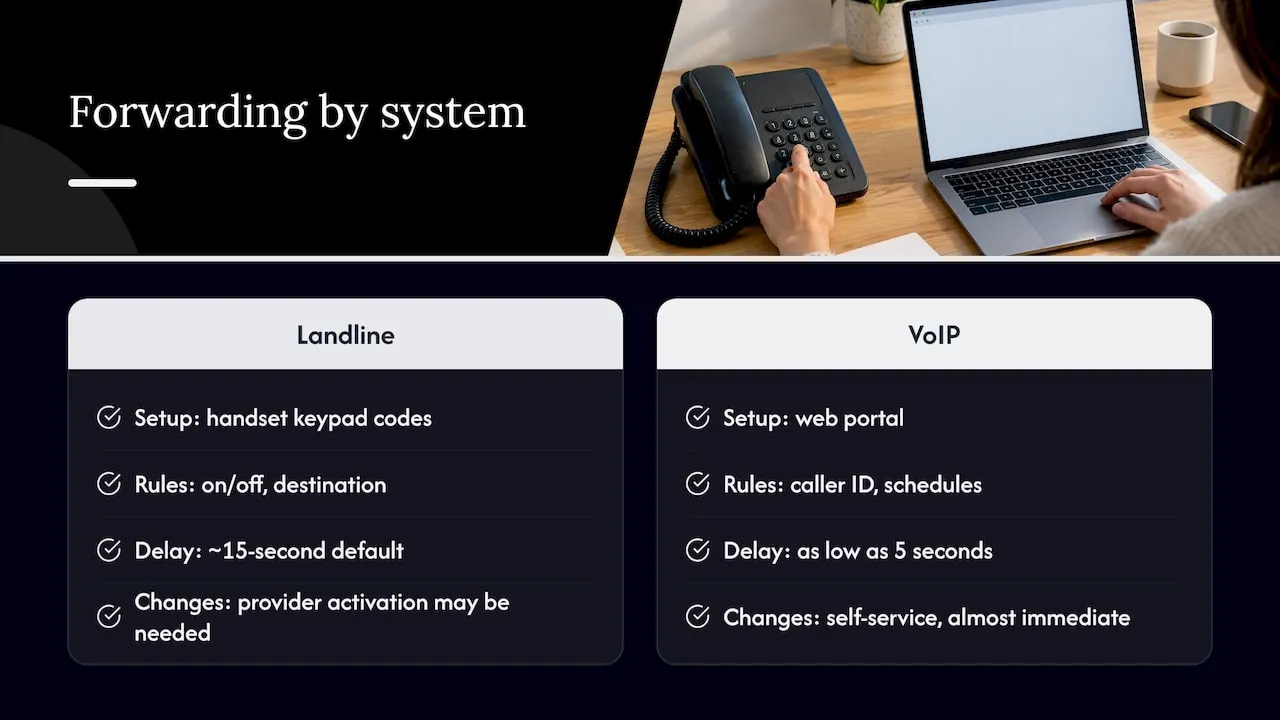
Traditional landlines and VoIP systems both offer call forwarding, but the way it’s configured and what it can do differs quite a bit. A landline typically relies on star and hash keypad codes dialled directly from the handset, such as 21 for unconditional forwarding, with options generally limited to turning forwarding on, off, or adjusting the destination number.
VoIP and hosted systems usually manage forwarding through a web portal rather than a dial code, and that portal-based approach tends to unlock more flexibility. Selective forwarding by caller ID, schedules that change forwarding rules by time of day, and shorter ring delays are all more common on cloud systems than on a standard landline. Some cloud platforms allow delay thresholds as low as five seconds, compared with the roughly 15-second default many landlines use for no-answer forwarding.
The other practical difference is billing and control. A landline’s forwarding is usually tied to the exchange and may need provider-side activation for certain variants, while VoIP forwarding is typically self-service through an admin account, with changes taking effect almost immediately rather than requiring a call to support. For a small business choosing between the two, the right option depends on how much control you want over forwarding rules and how often those rules need to change.
How forwarding fits alongside simultaneous ring and hunt groups
Call forwarding isn’t the only way to make sure a call reaches someone, and it’s worth knowing how it differs from simultaneous ring and hunt groups, since the three features solve a similar problem in different ways.
Simultaneous ring rings multiple devices at once, such as a desk phone and a mobile together, so whichever one is answered first takes the call. Forwarding, by contrast, sends the call to a single destination, either always or under specific conditions, rather than ringing several devices in parallel.
A hunt group works differently again, ringing through a list of numbers or extensions one after another, or in a set pattern, until someone picks up, which suits a small team sharing responsibility for a main line. Forwarding can sit on top of a hunt group as a fallback, so if nobody in the group answers within the hunt group’s own timeout, the call forwards onward to an external number such as a mobile or an answering service.
Used together, these features let a business build a layered response: a hunt group tries the team first, and forwarding steps in as the safety net if nobody’s free. On most hosted systems, these settings are configured independently in the same portal, which makes combining them straightforward once each piece is set up correctly.
Why forwarding still matters
Forwarding earns its place when it’s set up deliberately rather than left on autopilot, paired with a habit of verifying unexpected callers rather than trusting a number on a screen. Our setup guides are there when you need the specifics.
— Rob
Memorable numbers with forwarding built in
Memorable UK landline, mobile and non-geo numbers can be routed anywhere, whether that’s a single mobile, a VoIP handset or a hosted system with selective forwarding rules. For a hosted setup with routing options built in, our XL Premier Service covers the forwarding and number hosting together, while our XL Hosted Voice Service (XLHV) pairs a VoIP phone with the same flexibility.
If you need automated call handling on top of forwarding, Coastal Connect’s AI phone answering covers 24/7 inbound coverage for trades businesses that can’t staff a line around the clock. Search our database and reserve a memorable number for 30 days while you decide on the right setup.
FAQ
What happens when call forwarding is on?
Incoming calls to your number are automatically redirected to the destination you’ve set, such as a mobile or another landline, and the caller usually notices nothing different. The network creates a separate outgoing call for the redirected leg, which is why the account holder is normally billed for it.
What happens if call forwarding is off?
Calls ring the original device as normal with no redirection, so whoever is near that phone (or whichever voicemail is attached to it) handles the call directly. No second leg is created, so there’s no additional charge for a forwarded connection.
Should I have call forwarding on or off?
It depends on whether you need calls to reach you somewhere other than your main device. Forwarding helps when you’re away from a desk, travelling, or running a small business that needs one memorable number to route to whoever’s available, while it’s unnecessary if you’re always near the original phone.
What happens if your call has been forwarded?
As the caller, the call connects normally and you’re unlikely to notice anything beyond perhaps a slightly longer connection time. On landlines, some systems play an intermittent stuttered dial tone on the original line to signal that diversion is active, though this isn’t something the caller hears.
Sources
- Gov
- How to spot phone fraud | Stop! Think Fraud
- Report a scam call | NCSC
- giffgaff community: set up call forwarding
