Call divert, also called call forwarding, sends an incoming call from your number to another phone instead of ringing where you are. You set it up either through a network code dialled on the keypad or through your handset’s own settings menu. People use it when they are away from a device, already on another call, unreachable or want calls to land straight in voicemail or with a colleague.
TL;DR:
- Use the 21 code for all calls, 61 for unanswered calls, 67 when busy, and 62 when unreachable; enter UK destinations in +44 format.
- Prepaid plans may restrict forwarding to voicemail, and carriers can block codes on some tariffs, so confirm your plan supports the destination you need.
- A forwarded call usually creates a separately billed call leg at standard rates, while roaming may add roaming charges to that leg.
- After setup, look for the network confirmation and test from another phone; dial ##002# to clear all active diverts before resetting selected conditions.
Table of Contents
- How call divert works: network redirection and handset options
- Types of call divert and when to choose each
- How to set up call divert: USSD codes, Android and iPhone steps
- Costs, billing and roaming: how forwarded calls are charged
- Common problems and quick fixes
- How Phonenumbers.store helps UK users set up and manage call divert
- What matters more than the dial code
- FAQ
- Sources
- Carrier and regulator pages to verify codes and policy
How call divert works: network redirection and handset options
Call divert happens at two different points, and knowing which one you are using explains a lot about why it sometimes behaves oddly. The network itself can redirect a call before it ever reaches your handset, which is how USSD or GSM codes work. Your phone’s settings menu, by contrast, sends an instruction to the network asking it to set up that same redirection, so the outcome is usually identical, but the method of getting there differs.
Network-level forwarding is triggered by short codes dialled directly, and these follow a standard pattern across most UK carriers. According to Vodafone’s guide to managing call diverts, the common codes are:
- *21: diverts all incoming calls immediately, regardless of status.
- *61: diverts calls only when you do not answer.
- *67: diverts calls when your line is busy.
- *62: diverts calls when your phone is unreachable or switched off.
- ##002#: cancels every active divert in one go.
Handset menus simply wrap these same network instructions in a friendlier interface. On most Android phones and iPhones, you will find a “Call forwarding” or “Call divert” option buried inside the Phone or Calls settings, and filling in a destination number there triggers the same backend process as dialling a code manually. Carriers sometimes intervene directly, particularly on prepaid plans, where only voicemail forwarding is permitted rather than forwarding to any number you choose.
Types of call divert and when to choose each
Not every divert behaves the same way, and picking the right type matters more than most people realise. The main categories are built around specific conditions.
- Unconditional divert redirects every incoming call immediately, with no ringing on your own phone at all. This suits someone heading on holiday who wants all calls handled by a colleague or an answering service.
- No answer divert only activates after your phone rings for a set period without being picked up, making it useful as a safety net rather than a full handover.
- Busy divert kicks in specifically when you are already on another call, so a second caller is not left hearing an engaged tone.
- Unreachable divert covers situations where your phone is off, out of signal or in flight mode, catching calls that would otherwise fail outright.
- Time-based or selective divert, where supported by the network or a hosted voice service, lets you route calls differently depending on the time of day or who is calling.
A common practical example is a sole trader handing all calls to an assistant for the afternoon using unconditional divert, then switching back once they are free. Another is leaving “no answer” divert permanently active so missed calls fall through to voicemail rather than ringing out. Combining busy and unreachable diverts together gives a fuller safety net than relying on just one condition.
How to set up call divert: USSD codes, Android and iPhone steps
Setting up call divert takes under a minute once you know the exact codes and where the destination number goes. The codes follow the same format across UK networks, replacing the “number” placeholder with the full destination number.
- Divert all calls: *21+44xxxxxxxxxx#
- Divert when unanswered: *61+44xxxxxxxxxx#
- Divert when busy: *67+44xxxxxxxxxx#
- Divert when unreachable: *62+44xxxxxxxxxx#
- Cancel every divert: ##002#
On Android, the path typically runs through the Phone app, then Settings, then Calls, then Call forwarding, where you select the condition and type in the destination number. On an iPhone, it sits under Settings, then Phone, then Call Forwarding, where a single toggle and a number field handle everything. Both methods enter the destination number in international format rather than the usual UK style.
Once set, test the divert by calling your own number from a different phone and confirming it lands where expected. Vodafone’s device guide notes that networks typically send an on-screen confirmation pop-up the moment a divert is successfully set or removed, which is a more reliable check than relying on a test call alone.
For a fuller walkthrough with screenshots for both operating systems, our guide to setting up call forwarding covers the exact menu paths step by step.
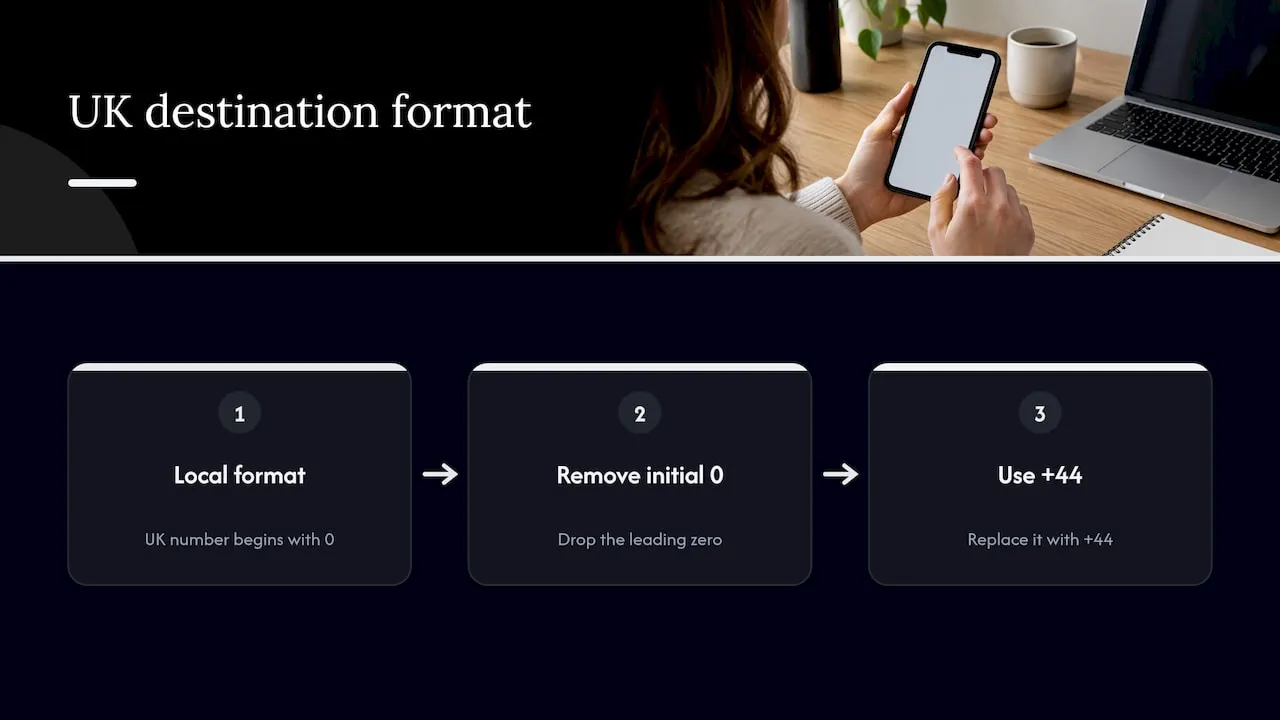
Pro Tip: Always replace a leading 0 with +44 when entering a UK destination number, since entering it in local format is the single most common reason a divert fails to activate.
Costs, billing and roaming: how forwarded calls are charged
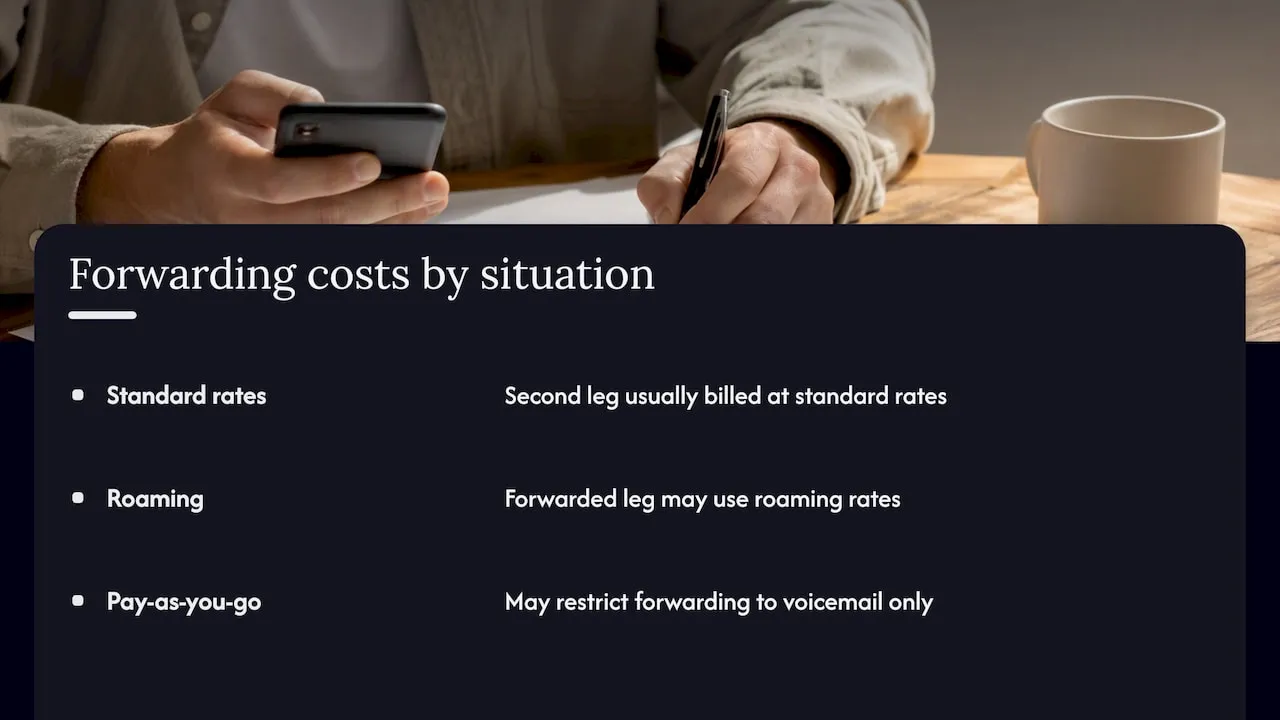
Forwarding a call does not make the original leg disappear financially. Vodafone’s guidance on business call divert explains that a diverted call typically creates a second, separate call leg between the network and the destination number, and that leg is usually billed at standard rates.
Forwarded calls are generally billed as a second leg under your plan’s standard calling rates, according to Vodafone Business, which matters most for anyone forwarding frequently or over long periods.
This becomes particularly relevant when roaming, since the forwarded leg may be charged at roaming rates even though the original caller pays nothing extra. Pay-as-you-go plans can also restrict forwarding to voicemail only, rather than to any chosen number, which is worth checking before you rely on it for business purposes. The safest approach is checking your specific plan or asking your carrier directly before leaving a long-term divert active, rather than assuming it behaves like a normal incoming call.
Common problems and quick fixes
Most divert failures trace back to one of a handful of causes, and each has a straightforward fix.
- Wrong number format: re-enter the destination number starting with +44 instead of a leading 0, then retest.
- Prepaid restrictions: PAYG plans often only support forwarding to voicemail, so check with your carrier if you need a custom destination.
- USSD errors or network blocks: if the code itself returns an error, contact your carrier, since some networks restrict forwarding on certain tariffs.
- Uncertain status: dial ##002# to clear every active divert at once, then reset only the ones you actually want.
If a confirmation pop-up never appears after dialling a code, treat that as a sign the divert was not accepted rather than assuming it worked silently.
How Phonenumbers.store helps UK users set up and manage call divert
We provide UK callers and businesses with memorable 01, 02 and 07 numbers that can be configured for call forwarding from day one, so getting the formatting right matters to us as much as it does to you. We point customers towards the correct +44 destination format whenever forwarding is involved, since it remains the most common reason a divert silently fails.
- Our setup codes guide covers the exact dial strings alongside scam checks worth running before you forward to an unfamiliar number.
- Our hosted forwarding explainer distinguishes handset dial codes from provider-managed forwarding, which matters for businesses running a hosted phone system.
- Businesses after a managed solution with forwarding built in can search available numbers directly on our site.
Taxi firms, tradespeople and small teams that need forwarding to multiple staff rather than a single destination often move on to a hosted service or a dedicated SIM rather than relying on handset codes alone.
What matters more than the dial code
The part of call divert that gets the least attention is also the part that causes the most grief: number formatting. Plenty of guides list the codes correctly but skip the detail that a UK number must go in as +44 rather than a leading 0, so readers follow every step precisely and still end up with a divert that silently fails.
The conventional advice also tends to treat handset menus and network codes as interchangeable without explaining that carriers can override either one on certain tariffs, particularly prepaid plans limited to voicemail-only forwarding. That distinction is worth checking before you assume a feature you’ve seen elsewhere will work on your own plan.
If you take one thing from this explainer, make it the habit of testing a divert immediately after setting it, rather than trusting that it worked just because the code went through. A confirmation message or a test call costs you thirty seconds and saves you a missed client or a missed delivery.
— Rob
FAQ
Where is call divert on my phone?
On Android, it sits in the Phone app under Settings, then Calls, then Call forwarding. On an iPhone, it is found under Settings, then Phone, then Call Forwarding, where a single toggle controls it.
What is the *#62 code used for?
*62 is the code used to divert calls when your phone is unreachable, such as when it is switched off or out of signal. It is entered as *62+44xxxxxxxxxx# followed by your destination number in international format, according to Vodafone.
Does call divert work when the phone is off?
Yes, but only if you have specifically set up the “unreachable” divert condition using the *62 code or the equivalent handset setting. A standard “no answer” or “busy” divert will not catch calls if the phone is powered off entirely.
Should I keep call forwarding on or off?
Leave an unconditional divert off unless you genuinely need every call routed elsewhere, since the forwarded leg is typically billed at standard rates. Conditional diverts for no answer or unreachable calls are generally safe to leave on as a permanent safety net.
Sources
- Manage call diverts & call forwarding | Vodafone Help
- Guidance on the provision of Calling Line Identification facilities and other related services
- Use call divert on a business phone | Vodafone Business Help
Carrier and regulator pages to verify codes and policy
- Manage call diverts & call forwarding | Vodafone Help
- Guidance on the provision of Calling Line Identification facilities and other related services | Ofcom
- Use call divert on a business phone | Vodafone Business Help
- One 555: Divert calls to alternative number | Vodafone UK
