Star and hash codes such as *#21# query or control your phone network’s call forwarding settings. They do not detect wiretaps, reveal government surveillance, or expose spying of any kind. Dialling 21 followed by a number activates unconditional forwarding, while *#21# simply asks your network to report whether forwarding is switched on.
TL;DR:
- Conditional forwarding often sends unanswered, busy, or unreachable calls to voicemail by default; that number usually reflects ordinary service configuration.
- Forwarding activation and cancellation codes vary by operator and plan, so confirm your provider’s instructions before changing network settings.
- An interrogation failure usually reflects a temporary network problem or plan restriction; retry later, then ask your provider to verify the setting.
- Businesses that share a line should have their provider manage forwarding, because handset settings can break when phones, SIM cards, or staff change.
- Never give an unsolicited caller forwarding codes or account details; hang up and call your provider using a number found independently.
Table of Contents
- How call forwarding works: network versus handset
- Common forwarding codes: what they check and what they change
- How to check forwarding status on your phone
- Interpreting common responses and what they mean for your calls
- Security and scams: what the codes do not tell you
- Call forwarding advice from our telecom experience
- When to check forwarding and who should make the changes
- How our services can help you manage forwarded numbers
- FAQ
- Sources
How call forwarding works: network versus handset
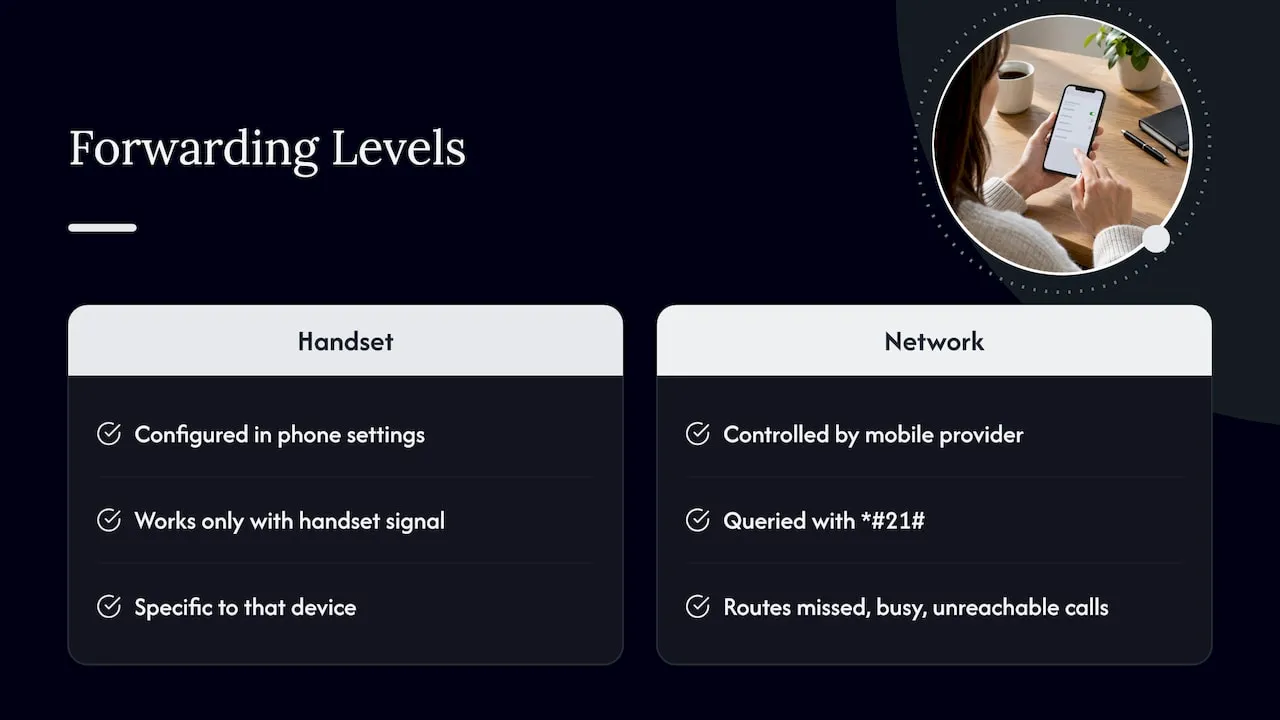
Call forwarding can sit in two different places, and mixing them up is the main reason people get confused by what a code tells them. The first is handset level forwarding, which lives inside your phone’s operating system, in the Settings app on an iPhone or inside the Phone app on Android. This type of forwarding only works when your handset has signal and the setting is correctly configured on that specific device.
The second is network level forwarding, which is controlled by your mobile operator or landline provider rather than your phone. This is the forwarding that star and hash codes actually talk to. When you dial *#21#, you are not asking your phone anything, you are sending a request straight to your network’s switching equipment, asking it to report back on the call forwarding service tied to your number.
Feature access codes like 21, #21#, and *#21# are not unique to one brand or network. They follow a standard pattern used across telecom systems, documented in technical specifications such as ETSI TS 122030, which defines how mobile networks should handle supplementary services including call forwarding and interrogation. That standardisation is why the same star codes tend to work in a similar way across different operators, even though the exact wording of the response you receive can vary.
This also explains why querying forwarding sometimes returns a number you did not expect, often your own voicemail. If conditional forwarding is set up (for when you are busy, do not answer, or are unreachable), the network’s default behaviour is frequently to forward to voicemail unless you have specifically pointed it elsewhere. Seeing a voicemail number in the response does not mean forwarding has been hijacked, it usually means a standard fallback is active. Ofcom’s numbering guidance covers how calls are routed through networks and why the number displayed during an interrogation reflects genuine service configuration rather than anything suspicious.
Understanding this split, handset settings on one side, network service on the other, matters because the two can disagree. You might switch forwarding off in your phone’s settings but still have it active at network level, or the reverse. When that happens, checking with a star code is the only way to see what the network itself believes is configured, which is precisely why these codes exist as a troubleshooting tool.
Common forwarding codes: what they check and what they change
Forwarding codes generally fall into three jobs: checking status, turning forwarding on, and turning it off. None of them inspect your calls for tapping or eavesdropping, they simply read or write a setting held by your network.
Interrogation codes ask the network a question rather than changing anything. Dialling *#21# is the standard example: it returns whether unconditional forwarding is active and, if so, which number calls are being sent to. Other interrogation codes exist for conditional scenarios, such as checking forwarding when busy or when there is no answer, though the exact code can vary slightly by operator and handset.
Activation and cancellation codes actually change your settings. A typical pattern is dialling a code followed by a destination number to turn forwarding on, and a separate cancellation code to switch it off entirely. These fall into two broad categories:
- Unconditional forwarding sends every incoming call straight to another number regardless of whether your phone is on, off, or already in use.
- Conditional forwarding only kicks in under specific circumstances: when the line is busy, when there is no answer after a set number of rings, or when the handset is unreachable (switched off or out of signal).
The difference matters in practice. A sole trader who wants every call answered, even while driving, might set unconditional forwarding to a colleague’s number during work hours. A small office, by contrast, is more likely to want conditional forwarding so calls only divert when no one picks up at the desk, keeping the main line active the rest of the time.
Conditional forwarding is the more common default on many networks because it balances reachability with keeping your own number as the primary point of contact. Unconditional forwarding tends to be used deliberately, for example when someone is travelling abroad and wants calls diverted to a local number, or when a business is switching over to a new line and needs a temporary bridge so no calls are lost.
Because exact code strings differ between operators and sometimes between contract types, the safest approach if you need to set up forwarding for a specific purpose is to check your provider’s own instructions rather than relying on a code copied from a forum. Our practical guide to common forwarding codes and UK fraud checks walks through the setup codes most UK networks use, alongside the security checks worth running at the same time.
How to check forwarding status on your phone
Checking whether forwarding is active takes a few minutes and works slightly differently depending on your device and provider.
- Dial the interrogation code. On most networks, dialling *#21# and pressing call will trigger a short pop-up or voice message telling you whether unconditional forwarding is on, and if so, which number it points to.
- Check your handset’s own forwarding settings. On an iPhone, this sits under Settings, then Phone, then Call Forwarding. On Android, it is usually under Phone app settings, then Supplementary Services or Calls, then Call Forwarding, though the exact menu path varies by manufacturer.
- Cross check with your provider if the result looks wrong. If the code reports something that does not match what you expect, or if you cannot interpret the response, your provider’s account portal or customer support line can confirm the actual network setting rather than guessing from a code’s output.
If you see a message saying interrogation failed, this is usually not a sign of anything sinister. It often means the network could not process the request at that moment, that the service is not supported on your current plan, or that you are on a network type (such as some VoIP or MVNO setups) where this particular code is not routed the same way. Trying again after a minute, restarting your phone, or checking directly with your provider usually resolves it.
Pro Tip: If a code gives you an unclear or blank response, call your provider’s support line and ask them to read back your call forwarding settings directly. This sidesteps any ambiguity in how your specific network or handset formats the result.
Interpreting common responses and what they mean for your calls
The response you get back from an interrogation code translates into a real effect on your incoming calls, though it helps to know what each outcome actually implies.
If the response shows a forwarding number and that number turns out to be your own voicemail, this almost always means conditional forwarding is active with its default fallback. Calls you miss are going to voicemail rather than ringing out, which is standard behaviour on most contracts rather than a fault.
If the response says forwarding is not active, but you are still missing calls, forwarding itself is not the problem. Common alternative causes include poor signal at your location, Do Not Disturb or silent mode being switched on, a full voicemail box rejecting new messages, or the caller being blocked, either deliberately or through an aggressive spam filter on your handset.
An interrogation failed response, as covered above, usually points to a temporary network issue or a service restriction on your specific plan rather than a problem with your actual call handling. If it persists across multiple attempts and multiple locations, that is the point to escalate to your provider’s support team, since it may indicate an account level restriction rather than a transient fault. Ofcom’s guidance on numbering and call routing is useful background here, since it explains the responsibilities networks carry for accurate call delivery and why the number shown in these responses reflects genuine routing rather than a glitch.
Security and scams: what the codes do not tell you
Here is the claim worth repeating plainly: dialling *#21# does not detect wiretaps, does not reveal whether the FBI, police, or anyone else is listening to your calls, and does not expose spyware on your phone. This misconception spread widely online, and Forbes addressed it directly, explaining that the code only reports standard call forwarding service settings, something telecoms engineers have confirmed for years. Security experts quoted in that piece point people back towards official provider tools rather than viral code checks for anything related to call security.
The genuine risk around forwarding is not surveillance, it is fraud. Scammers use vishing (voice phishing) to trick people into revealing codes or account details over the phone, and spoofing to make a scam call appear to come from a trusted number. Which? consumer guidance notes that the realistic threat sits with social engineering rather than government interception, and recommends treating any unsolicited request to change your forwarding settings with suspicion.
Practical steps worth taking:
- Never share forwarding codes, PINs, or account passwords with someone who called you unprompted, even if they claim to be from your network.
- Verify suspicious calls by hanging up and ringing your provider back on a number you look up independently, never one given to you during the call.
- Report scam calls and texts in the UK by forwarding them to 7726, a free reporting shortcode used across networks, as detailed in Which?'s spoofing guidance.
- Treat displayed caller ID as unverified by default, since spoofing can make any number appear genuine.
For a deeper look at spotting spoofed or faked local numbers, our guide on spotting UK VoIP caller spoofing covers the warning signs in more detail.
Call forwarding advice from our telecom experience
Working with memorable UK numbers day to day means we see the gap between a one-off handset code and a properly managed routing setup fairly often. Dial codes are fine for checking or adjusting forwarding on a single personal line, but they depend on the handset staying configured correctly and on the specific network supporting that exact code string.
For a business, that fragility becomes a real cost. A shop or taxi firm relying on handset level forwarding risks losing calls the moment a phone is swapped, a SIM is replaced, or an employee leaves with the device. Hosted or network level forwarding, set and managed through a provider account rather than a dial code, keeps the routing intact regardless of which handset is answering.
If you are setting this up for the first time, our walkthrough on setting up call forwarding for UK small businesses covers the common pitfalls, including mistakes with +44 prefixes that trip up a lot of first time setups. We also have a breakdown of why hosted forwarding is a provider setting rather than a dial code, which is worth reading before committing a team’s main line to handset-dependent forwarding.
Portability matters here too: a number that can move between providers without losing its forwarding configuration gives a growing business far more flexibility than one locked to a single handset’s settings.
When to check forwarding and who should make the changes
If you are checking forwarding on a personal line because you suspect you are missing calls, running the interrogation code yourself is perfectly reasonable, it takes a minute and tells you exactly what is configured. Businesses are a different matter. Once more than one person relies on a line, forwarding changes belong with whoever manages the provider account or a dedicated admin, not with whoever happens to have the handset.
Small operations juggling several staff phones should lean towards hosted numbers with provider-managed forwarding rather than individual dial codes, since it removes the risk of one handset’s settings breaking continuity for the whole team. Escalate to your provider or an IT contact whenever a check returns an unexpected result you cannot explain, rather than guessing or retrying codes repeatedly.
— Rob
How our services can help you manage forwarded numbers
Handset codes work fine for checking your own personal line, but they start to show their limits the moment a business depends on calls always landing in the right place. We sell and rent memorable UK numbers, 01, 02, 03, 08 and 07, built to be routed wherever you need them, with forwarding managed through your account rather than left to a single phone’s settings.
That matters most in a few common situations:
- Switching providers or phones without wanting to reprint business cards or update a website number.
- Running a shared line across a small team, where forwarding needs to follow the business, not one employee’s handset.
- Covering a planned switchover or outage with a temporary routing change that does not depend on anyone dialling a code correctly.
Our XL Hosted Voice Service with a VoIP phone costs £7.86 per month with a £30 one-off set-up charge, and gives a business a managed line with routing handled on our side rather than yours. For businesses wanting to keep an existing BT-style number while moving it onto broadband, our XL-IP service starts from £8 per month with a £99 router and set-up fee. If you are still choosing a number, our search tool lets you reserve one for 30 days for £10 while you confirm your setup.
If you are a tradie or small operator wanting ready-made call handling scripts to pair with a forwarded line, Ask Hayley’s phone answering scripts are a useful starting point for getting calls answered consistently once forwarding is live.
FAQ
What is *#21 used for?
Dialling *#21# asks your network to report whether call forwarding is currently active on your line and, if it is, which number calls are being sent to. It is a status check rather than a setting change, and it does not detect wiretaps or surveillance, as explained in Forbes’s debunking of the viral claim.
What’s the number to stop call forwarding?
Cancellation codes vary by operator, but most networks use a short star-hash sequence (commonly ##21# for unconditional forwarding) to switch it off entirely. Check your specific provider’s support pages for the exact code, since the string can differ between networks and contract types.
What does setting interrogation failed mean on iPhone?
This message usually means the network could not process the status request at that moment, often due to a temporary service issue or a plan restriction rather than a fault with your phone. Restarting the handset or trying again shortly often resolves it, and your provider can confirm the actual setting if it persists.
How do I change call forwarding on my phone?
On an iPhone, go to Settings, then Phone, then Call Forwarding, and toggle the setting on or off. On Android, the option typically sits under the Phone app’s settings menu labelled Calls or Supplementary Services, though the exact path depends on the manufacturer.
Sources
- Can Calling *#21# Reveal FBI iPhone Wiretap? — Forbes
- Phone scams — Which?
- Phone numbering guidance — Ofcom
