
Call forwarding, also called call diversion, redirects incoming calls from one phone number to another destination automatically. The caller dials your original number; the network silently reroutes the call to wherever you choose, whether that is a mobile, another landline, or a VoIP line.
The essentials at a glance:
- Check whether forwarding is active: dial
*#21#from your handset and read the status message. - Cancel all-calls forwarding: dial
#21#to deactivate it immediately. - Privacy note: the Information Commissioner’s Office (ICO) warns that forwarding business calls to a personal mobile can expose your private number to callers.
- PSTN transition: BT’s PSTN switch-off is progressing across the UK, making VoIP-based routing increasingly relevant for permanent forwarding.
- Example business number: a memorable number such as 01159 456456 can be forwarded to any mobile or office line, keeping your public number consistent.
Key takeaways
Call forwarding redirects incoming calls to a second number via two call legs, which means the forwarding party can incur charges and must manage privacy settings carefully.
| Point | Details |
|---|---|
| Core definition | Call forwarding redirects incoming calls to another number, automatically and silently. |
| Check and cancel codes | Dial *#21# to check status; dial #21# to cancel all-calls forwarding. |
| Two call legs mean potential charges | The outbound leg is often chargeable; confirm your plan terms before using forwarding heavily. |
| Privacy risk on personal mobiles | The ICO warns that forwarding to a personal mobile can expose your private number to callers. |
| VoIP for permanent routing | Hosted VoIP avoids per-minute divert charges and is more future-proof as PSTN lines retire. |
Table of Contents
- What is the meaning of call forwarding?
- What are the different types of call forwarding?
- How does call forwarding actually work?
- How to set up and deactivate call forwarding on any device
- What keypad codes do you use to manage call forwarding in the UK?
- Who pays for forwarded calls, and how much does it cost?
- When should you use call forwarding?
- What are the UK privacy rules around call forwarding?
- How do you check whether call forwarding is working?
- Why are businesses moving beyond basic call forwarding?
- An honest view on call forwarding in 2026
- Sources
- FAQ
What is the meaning of call forwarding?
Call forwarding is a telephony feature that intercepts an incoming call at the network level and redirects it to a different number before your phone even rings, or after a set number of rings, depending on how you configure it. The industry also uses the terms call diversion and divert interchangeably; BT’s own support pages use “Call Diversion” throughout.
It is worth distinguishing call forwarding from two features people often confuse it with. Call transfer happens mid-call: you answer, then manually transfer the caller to someone else. Voicemail captures a message when you do not answer; it does not connect the caller to a live person elsewhere. Call forwarding, by contrast, connects the caller to a different live destination without them needing to do anything.
The Cambridge Dictionary defines it plainly as “a phone service that allows calls to be sent automatically to another phone number.” Everyday examples make the feature concrete: forwarding your home landline to your mobile when you are out for the day, or routing a business landline to a colleague while you are on annual leave.
What are the different types of call forwarding?
There are two broad categories, and choosing the wrong one is the most common mistake people make.
Unconditional forwarding redirects every incoming call immediately, without your original phone ringing at all. The line goes silent from your end. This is useful for a short period, say a day away from the office, but easy to forget. Leave it on by accident and callers will never reach you on your main number.
Conditional forwarding only kicks in when a specific condition is met. The three standard conditions are:
| Condition | What triggers the forward |
|---|---|
| No answer | Original phone rings for a set number of rings, then diverts |
| Busy | Original line is engaged, so the call diverts immediately |
| Not reachable | Handset is off, out of signal, or in flight mode |
Conditional forwarding is the more practical day-to-day choice. Your phone rings normally; the divert only fires if you genuinely cannot answer. Most people set “no answer” forwarding so calls roll to a mobile after four or five rings rather than going to voicemail.
Pro Tip: Get into the habit of dialling *#21# after any forwarding session to confirm the status. Practitioners consistently flag that unconditional diverts left running are the single most common cause of a mysteriously silent landline.
How does call forwarding actually work?
When a call arrives at your number, the network checks whether a divert instruction is active. If one is, it does not simply hand the call to your handset; it originates a second outbound call leg to the forwarding destination.
A forwarded call therefore creates two call legs: the inbound leg from the caller to your original number, and a new outbound leg from the network to your forwarding destination. This is the mechanism behind any extra charges you might see on your bill.
What each party experiences:
- The caller dials your number as normal. They may hear a single ring or a brief pause, then the call connects. Most callers never know a divert is in place.
- The recipient (you, on the forwarding destination) answers as usual. Depending on your provider and handset, you may see the original number, the caller’s number, or a network indicator that the call was diverted.
- The original line may produce a stutter dial tone when you pick it up, signalling that a divert is active. Not all providers do this, so do not rely on it as your only check.
Always test with a second phone after setting a divert. Dial your original number from a mobile or a colleague’s handset and confirm the call arrives where you expect it.
How to set up and deactivate call forwarding on any device
iPhone
- Open Settings and tap Phone.
- Tap Call Forwarding.
- Toggle Call Forwarding on.
- Tap Forward To and enter the destination number.
- Return to the previous screen; the toggle stays green when active.
To deactivate, return to Settings > Phone > Call Forwarding and toggle it off.
Android
- Open the Phone app and tap the three-dot menu or Settings (exact location varies by manufacturer and Android version).
- Select Call settings or Supplementary services.
- Tap Call forwarding and choose the condition (Always forward, Forward when busy, etc.).
- Enter the destination number and tap Enable or Turn on.
To cancel, return to the same menu and tap Disable or Turn off for each active condition.
Landline (keypad codes)
BT’s support pages confirm that many modern digital handsets provide quick-access buttons for diversion, but the universal method is keypad codes. Pick up the handset and:
- Dial
*21*followed by the full destination number (including the area code), then#. - Listen for a confirmation tone or recorded message.
- Replace the handset. The divert is now active.
To cancel: pick up and dial #21#. To check status: dial *#21#.
For VoIP or hosted phone systems, log into your provider’s online portal or app rather than using keypad codes; the routing rules are managed centrally.
Pro Tip: Before leaving an all-calls divert running permanently, ring your provider and ask whether forwarded calls count against your inclusive minutes or attract a per-minute charge. The answer varies significantly by plan.
A practical checklist for business owners covers additional configuration steps if you are setting up forwarding across multiple lines.
What keypad codes do you use to manage call forwarding in the UK?
The codes below are standardised across most UK providers and work on the majority of landlines. Mobile networks use the same GSM codes, though the exact behaviour can differ.
| Action | Code |
|---|---|
| Set all-calls forward | *21*[full number]# |
| Cancel all-calls forward | #21# |
| Check all-calls status | *#21# |
| Set forward on no answer | *61*[full number]# |
| Cancel forward on no answer | #61# |
| Check no-answer status | *#61# |
| Set forward when busy | *67*[full number]# |
| Cancel forward when busy | #67# |
| Check busy status | *#67# |
Provider variation: these codes work on most UK landline and mobile networks, but some providers, particularly smaller MVNOs and digital-only services, route forwarding through an app or portal rather than GSM codes. If a code produces an error tone, check your provider’s support pages.
One warning worth repeating: entering a wrong digit in the destination number silently forwards your calls to the wrong person. Always test by calling from another phone immediately after setting a divert.
Who pays for forwarded calls, and how much does it cost?
The two-call-leg structure has a direct billing consequence. The owner of the forwarded line typically bears the cost of the outbound leg, because the network is originating a new call on their behalf.
How charges typically break down in the UK:
- Landline to mobile forwards: the forwarding party usually pays a landline-to-mobile rate for the outbound leg, which can be higher than a standard landline call.
- Mobile plan forwards: UK mobile networks vary considerably in how they treat forwarded calls. Some include them within your inclusive minutes; others charge them as standard outbound calls. Read your plan’s terms before relying on forwarding heavily.
- VoIP and hosted systems: forwarding within a hosted platform typically avoids per-minute divert charges. Calls are routed internally, and the monthly subscription covers the routing. For high-volume forwarding, this is usually the more cost-effective model.
The practical upshot: a temporary divert for a day or two is unlikely to cause a billing surprise. A permanent all-calls divert on a busy business line is a different matter entirely.
When should you use call forwarding?
Call forwarding suits a specific set of situations rather than being a permanent solution for everyone.
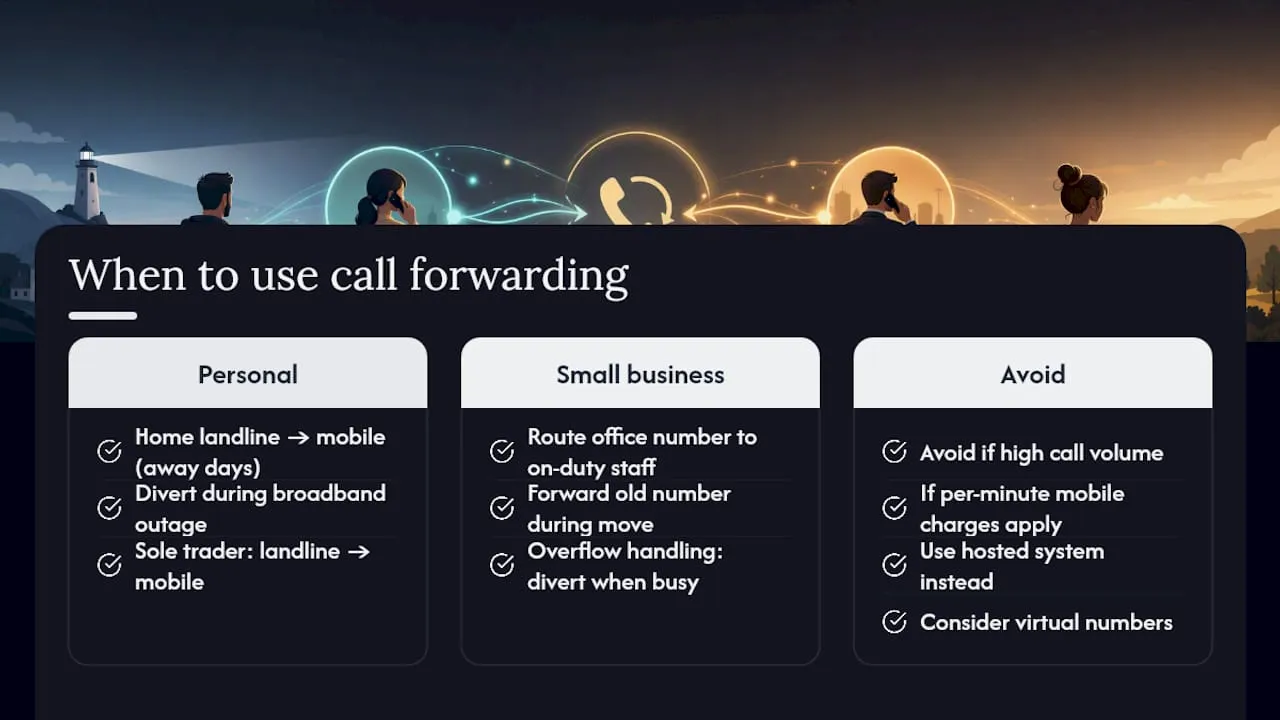
Personal use cases are fairly simple: forwarding a home landline to your mobile when you are away for a few days, or diverting calls during a broadband outage so you do not miss anything urgent. Sole traders often forward a landline number to their mobile so clients reach a consistent, professional-sounding number rather than a personal mobile.
Small business use cases are where the feature earns its keep. A small team can route an office number to whoever is on duty that day. A business moving premises can forward the old number to the new line while updating directories. Overflow handling, where calls divert to a second person when the first is busy, is a common conditional-forwarding setup.
When not to use it: if your line takes a high volume of calls and you are forwarding to a mobile on a plan that charges per forwarded minute, costs accumulate quickly. At that point, redirecting business calls through a hosted system is the more sensible route. Virtual numbers, which present a consistent business caller ID while routing to any destination, are worth considering for any business that wants to separate its public number from staff personal mobiles.
What are the UK privacy rules around call forwarding?
This is the area most guides skip, and it matters more than people realise.
The ICO’s guidance on line identification under PECR is clear: when a business forwards professional landline calls to a staff member’s personal mobile, the recipient’s private number can potentially be identified by the caller. Providers are required to offer a free and simple option to withhold the personal number in this scenario.
This is not a ban on forwarding to personal mobiles. It is a requirement to handle it carefully. If a client calls your business landline and the call forwards to your personal mobile, that client could, depending on their handset and network, see your personal number in their call log.
The practical fix is to use a business or virtual number as the forwarding destination, or to configure your provider’s CLI withholding option before enabling the divert. For businesses with multiple staff, protecting business phone numbers from exposure is a broader discipline that forwarding hygiene sits within.
Pro Tip: Ask your provider explicitly whether CLI withholding is active on your line before forwarding business calls to a personal mobile. Do not assume it is on by default.
How do you check whether call forwarding is working?
If you suspect a divert is active but are not sure, or if you have set one up and want to confirm it is routing correctly, follow these steps.
- Dial
*#21#from the handset in question. The network will return a status message showing whether all-calls forwarding is active and, if so, the destination number. - Call your original number from a separate phone. This is the definitive test. If the call arrives at the forwarding destination, the divert is working. If it rings on the original handset, the divert is not active.
- Check conditional codes separately. Dial
*#61#for no-answer status and*#67#for busy status. A divert can be active on one condition and not another. - Listen for a stutter dial tone when you pick up the handset. Some UK providers use this as a passive indicator that a divert is running, though not all do.
- Log into your provider’s portal if you use a VoIP or hosted service. The routing rules are visible in the dashboard and easier to audit than keypad codes.
Common problems and fixes:
- Silent landline, no calls arriving: almost always an unconditional divert left active. Cancel with
#21#. - Calls going to the wrong number: cancel the divert, re-enter the destination carefully, and test again.
- Codes not working: your provider may use a portal-based system. Check their support pages or ring customer services with your line number and the times you attempted the codes.
Why are businesses moving beyond basic call forwarding?
Keypad codes do the job for occasional or temporary diverts. For anything more structured, cloud-hosted VoIP systems offer a different level of control.
Advantages of hosted VoIP for call routing:
- Routing rules set via an app or web portal, not a handset keypad.
- Scheduled rules: route calls to one number during business hours, another after 6 PM.
- Ring groups: calls ring multiple team members simultaneously.
- Voicemail-to-email: missed calls arrive as audio files in your inbox.
- No per-minute divert charges in most hosted plans.
- Predictable monthly pricing regardless of call volume.
Why virtual numbers specifically help businesses: a virtual number presents a consistent public caller ID while routing to any destination you choose. Staff personal mobiles stay private. The business number stays the same regardless of who is answering or where they are working.
The PSTN/ISDN retirement makes this more than a preference. As traditional copper lines are retired across the UK, keypad-code forwarding on PSTN lines will eventually cease to be an option. VoIP is the more future-proof foundation for permanent call routing.
An honest view on call forwarding in 2026
Call forwarding is one of those features that sounds simple until you actually rely on it for something important. The keypad codes work, and for a day’s absence or a temporary redirect they are perfectly adequate. Where people run into trouble is treating a quick fix as a permanent solution.
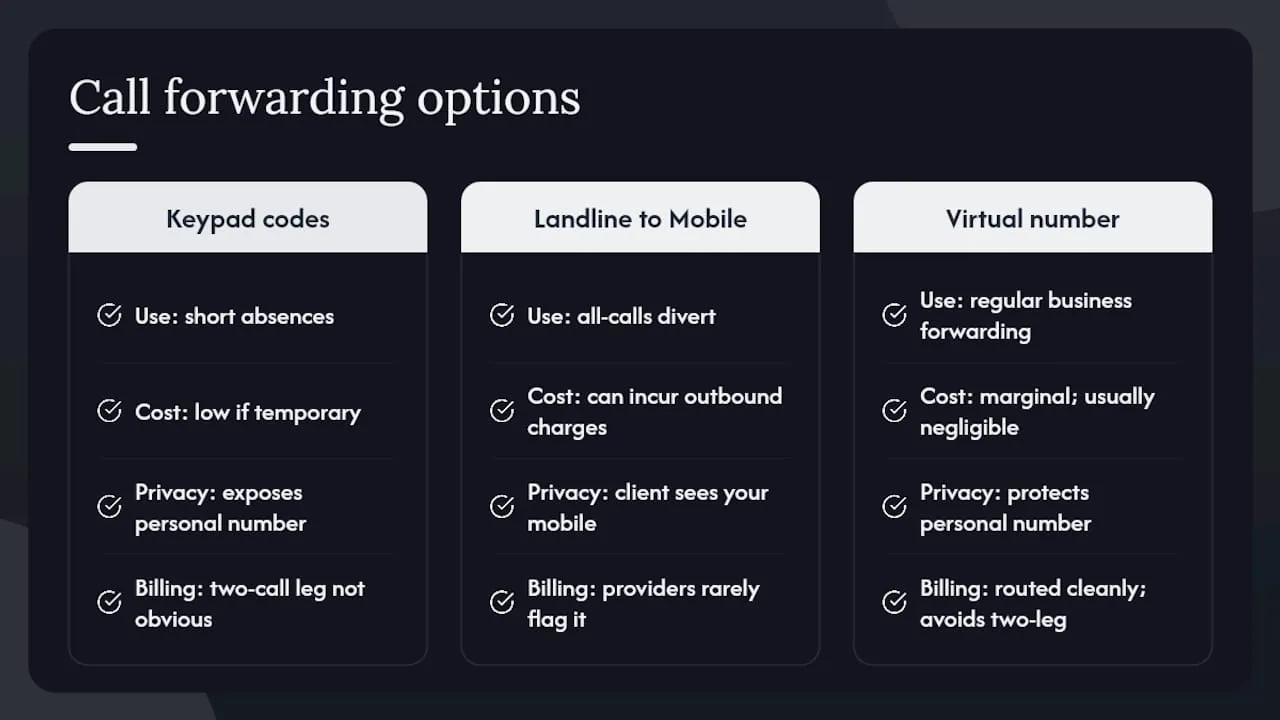
The billing model catches people out most often. A sole trader who sets an all-calls divert from a landline to a mobile and then forgets about it for a month can accumulate meaningful charges, particularly if the mobile plan treats forwarded calls as chargeable outbound calls. The two-call-leg structure is not obvious from the user’s perspective, and most providers do not flag it prominently.
The privacy angle is underappreciated. Forwarding a business landline to a personal mobile feels harmless, but the ICO’s guidance exists for a reason. A client who can see your personal number in their call log is a client who can contact you outside working hours on a number you never intended to share. A virtual number or a hosted routing system solves this cleanly, and the cost difference for a small business is usually negligible.
My honest recommendation: use keypad codes for temporary diverts, and invest in a proper virtual number or VoIP setup the moment forwarding becomes a regular part of how your business operates. The control and privacy you gain are worth far more than the marginal cost.
Sources
- Guide to PECR: line identification (CLI) | ICO
- Divert landline to mobile: step-by-step UK guide 2026 | Connection Technologies
- Call forwarding — Wikipedia
- CALL FORWARDING | English meaning - Cambridge Dictionary
- Call Diversion — BT Help
- How to divert calls from a landline to a mobile (UK) | WhoCalledLookup
FAQ
What does call forwarding mean on a phone?
Call forwarding means your incoming calls are automatically redirected to a different number before or after your phone rings. The caller dials your original number and is connected to wherever you have set the divert, without needing to do anything themselves.
What happens if call forwarding is switched on?
Your original phone may ring briefly or not at all, depending on whether you have set unconditional or conditional forwarding. Incoming calls route to the destination number you specified, and the caller usually experiences a seamless connection.
What does it mean when you call someone and it says “call forwarding”?
It means the person you are calling has set a divert on their line. Your call is being redirected to another number, typically a mobile or a colleague’s line, rather than ringing on the original handset.
Who pays for a forwarded call in the UK?
The owner of the forwarded line typically bears the cost of the outbound leg. UK mobile networks vary in whether forwarded calls count against inclusive minutes or attract a separate per-minute charge, so checking your plan terms is advisable.
How do I check whether call forwarding is active?
Dial *#21# from the handset to see the current all-calls forwarding status. Then call your original number from a separate phone to confirm calls are arriving at the correct destination.
