A UK mobile example is 07700 900 982, written internationally as +44 7700 900 982 with the leading zero dropped. For demonstrations, forms or screenshots, stick to the reserved 07700 900000 to 900999 range, which Ofcom and GOV.UK set aside so nobody accidentally dials a real customer.
TL;DR:
- Format domestic numbers as 07700 900 982, convert internationally to +44 7700 900 982, and let forms accept either version with spaces or brackets.
- Ofcom classifies 071 to 075 and 077 to 079 as ordinary mobiles; 070 serves personal numbering, 076 radiopaging, and allocations change weekly.
- Use only 07700 900000 to 900999 for demonstrations, forms, or screenshots; GOV.UK reserves that block to avoid exposing a real customer’s number.
- A memorable number suits businesses whose customers must recall it unaided, such as taxi firms or tradespeople; elsewhere, its sales benefit may not justify the cost.
- Before buying, verify the current allocation with Ofcom and ask whether delivery includes a SIM, forwarding, porting, call bundles, or a 30 day reservation.
Table of Contents
- Practical examples of UK mobile numbers and how to format them
- Which 07 ranges are ordinary mobile, and why it matters
- How to display numbers correctly in forms and demonstrations
- How to check allocation and the next steps to buying a number
- When a memorable mobile number is worth it
- Search, reserve and set up a memorable mobile number
- FAQ
- Sources
Practical examples of UK mobile numbers and how to format them
A UK mobile number always has digits starting with 07. Written for a business card or a web form, it looks like 07700 900 982: the space after the first five digits and another after the next three make it easy to read at a glance. Strip the spaces for anything that processes the digits automatically, such as a database field or an API call, and you get 07700900982.
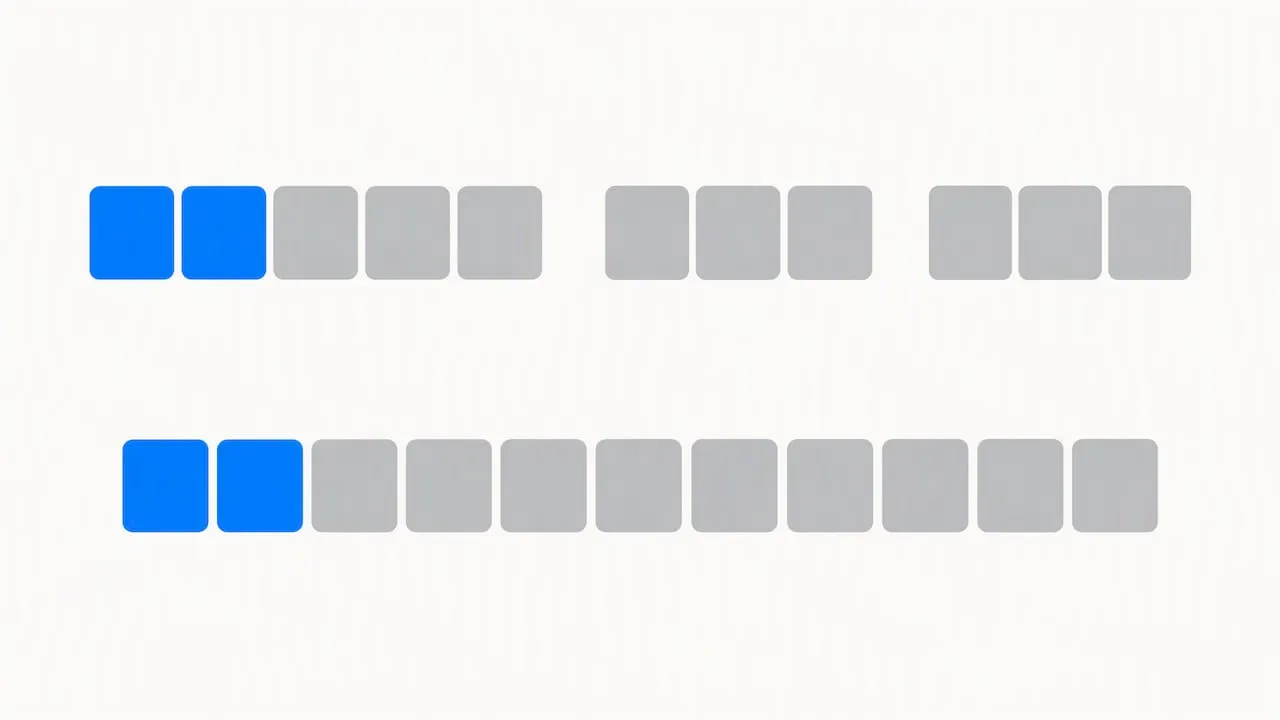
Converting to international format means swapping the leading 0 for the UK country code, 44, and keeping the rest unchanged. So 07700 900 982 becomes +44 7700 900 982. The GOV.UK Design System recommends that any input field accept both the domestic and the +44 form, since callers abroad and UK based CRM systems often need different formats for the same number.
Mobile ranges span several prefixes, and the following are illustrative only, not live numbers:
- 071xx: for example 07100 900 123
- 074xx: for example 07400 900 456
- 077xx: for example 07700 900 982
- 079xx: for example 07900 900 789
Every one of these follows the same spacing convention: five digits, a space, then three plus three.
Which 07 ranges are ordinary mobile, and why it matters
Not every number beginning 07 behaves like a standard mobile line. Ofcom’s numbering data classifies 071 to 075 and 077 to 079 as ordinary mobile ranges, the kind issued to everyday handsets and SIM cards. The 070 range is reserved for personal numbering services, and 076 covers radiopaging, so neither behaves like a typical mobile line a customer would expect to call at standard rates.
Ofcom updates its allocation files weekly, which means a prefix on its own never guarantees who currently holds a block or how it is routed, so the only reliable check is the live data itself, via Ofcom’s numbering data.
This distinction affects more than paperwork:
- Callers often judge 070 numbers as costly or suspicious, since personal numbering services have a reputation for high connection charges.
- A genuine 077 to 079 mobile number reads as trustworthy and ordinary to most callers.
- Cost expectations differ too. Gov confirms that mobile numbers start with 07 and sets out the typical charge ranges callers face, which is worth checking before settling on a prefix for a customer-facing line.
Choosing the right range before you buy avoids the awkward position of marketing a number that looks premium rate to the very customers you are trying to reach.
How to display numbers correctly in forms and demonstrations
Getting the format right matters as much for internal documentation as it does for a customer-facing website. The GOV.UK Design System sets out a few rules worth following on any UK site or form:
- Accept spaces, hyphens and brackets in user input rather than forcing one rigid format.
- Allow a leading +44 as well as the domestic 0, since some users will paste in an international format without thinking.
- Display the number back to the user in a readable grouped form, such as 07700 900 982, rather than an unbroken string.
- State clearly in hint text when a field needs a UK-only number, a mobile-only number, or accepts international numbers too.
For any example used in training material, a mock-up, or a demo screenshot, use the reserved block rather than a real customer’s number. The GOV.UK Design System names 07700 900000 to 900999 specifically for this purpose, so a developer, designer or marketer never risks dialling or displaying someone’s actual mobile line by mistake.
Pro Tip: When writing form hint text, say exactly what you’ll accept, for example “UK mobile number, e.g. 07700 900 982”, so users don’t guess the format.
How to check allocation and the next steps to buying a number
Before buying or renting a memorable mobile number, it helps to know where it sits in the national allocation system. Ofcom’s numbering data publishes which blocks belong to which provider and refreshes that picture weekly, so a number that looked available last month might have moved on.
When talking to a seller, worth asking:
- Confirmation of which range the number sits in and who currently holds the allocation.
- Whether the number comes with a SIM, call forwarding, or needs porting from an existing provider.
- What minutes or call bundles, if any, are included once the number is live.
- Whether a short-term reservation is available while you decide.
A simple way to frame the decision before you commit:
| Step | What to check |
|---|---|
| Allocation | Confirm the range and current holder via Ofcom numbering data |
| Delivery | Decide between SIM, hosted line, or forwarding to an existing number |
| Minutes | Check what’s included for calls to 01/02/03 numbers and top mobile networks |
| Reservation | Hold the number for 30 days while finalising the decision |
When a memorable mobile number is worth it
A memorable number only pays off when customers actually need to recall it without looking it up, a taxi firm taking last-minute bookings, a tradesperson whose van is the advert, a startup that wants its number to stick after one glance at a flyer. Outside those situations, the uplift is marginal, and businesses sometimes spend more chasing a catchy sequence than it returns in extra calls.
What gets missed most often is the prefix check. A number can look perfect on the page and still sit in a range that reads as a personal numbering service or carries an unexpected call charge for the person dialling in. Verifying the range against Ofcom’s numbering data before purchase is the step that separates a genuinely useful number from a false economy.
— Rob
Search, reserve and set up a memorable mobile number
We built our search tool so you can look up patterns, area codes, towns or specific digit sequences across our full database, without wading through a call centre script first.
Once you’ve found a number you like, a 30 day reservation holds it while you sort out the practical side: whether you want it on a SIM, hosted and forwarded to an existing line, or wired into a telephony setup. Our XL Mobile SIM plan covers the SIM route directly, and for businesses that want a fuller setup with onboarding support, our XL Premier Service adds assisted hosting for £9.60 a month plus a £14.40 one-off set-up fee.
If you’re weighing up cloud-based call handling alongside the number itself, Vadacom’s cloud business phone system is worth a look for call flows and IVR once your number is live.
To get moving:
- Search by pattern, prefix or town on our number search page.
- Reserve your choice for 30 days while you confirm delivery details.
- Pick a SIM, hosted line or forwarding setup to suit how your business actually takes calls.
Start your search on Phonenumbers and see what’s available right now.
FAQ
What does a standard UK mobile number look like?
A UK mobile number starts with 07, written for readability as 07700 900 982. Written internationally, the leading 0 is dropped and replaced with the UK country code, giving +44 7700 900 982.
Which 07 prefixes count as genuine mobile numbers?
Ofcom classifies 071 to 075 and 077 to 079 as ordinary mobile ranges. The 070 range covers personal numbering services and 076 covers radiopaging, neither of which behaves like a standard mobile line.
Is it safe to use any 07700 number as an example on a website?
No, only the reserved block is safe to publish. GOV.UK reserves 07700 900000 to 900999 specifically for demonstrations, forms and screenshots, so using any other number risks displaying a real customer’s line.
How much does it cost to get a memorable UK mobile number set up?
Costs depend on the hosting route you choose. Our XL Premier Service runs at £9.60 a month with a £14.40 one-off set-up charge, while a 30 day reservation on a chosen number costs £10.
How long does it take to acquire a memorable mobile number?
Searching and reserving a number can take minutes once you’ve found the pattern you want. Setting up hosting, a SIM or forwarding typically follows within a few working days, depending on which delivery option and provider checks are needed.
