Caller ID on Android is the feature that shows you who is calling before you answer. It also decides what the person you call sees when your phone rings theirs. Two separate things sit under that one name: the number the network passes along with the call, and the name or business label your phone adds afterwards. This guide explains both, shows where the settings live, and covers what taxi firms, plumbers and other small UK businesses should know about the number their customers see.
TL;DR
- Caller ID on Android has two parts: the number sent by the network (called CLI in the UK) and the name label added by your phone, such as Google’s caller ID and spam lookup.
- You can switch Google’s caller ID and spam protection on or off in the Phone app, and you can hide your own outgoing number from the SIM’s call settings, though some operators do not support hiding.
- ‘No Caller ID’ and ‘Unknown’ are not the same thing, and neither proves a call is a scam. Spoofing means a number on screen is never proof of who is calling.
- If you run a business, the number your customers see is part of your brand. A memorable, consistent number gets calls returned and remembered.
Table of Contents
- What caller ID actually is
- How caller ID works on Android
- ‘No Caller ID’, ‘Unknown’, ‘Withheld’: what each one means
- Why a number on screen is not proof of identity
- Caller ID for taxi firms, plumbers and other small businesses
- Our perspective: caller ID is brand, not just a setting
- Getting a business number that shows up well
- Quick checklist: set up caller ID on Android properly
- FAQ
- Sources
What caller ID actually is
When you dial, your phone or network sends the number you are calling from as part of the call set-up. The receiving phone reads it and displays it. In the UK, regulators call this Calling Line Identification, or CLI. Ofcom’s CLI guidance describes it as a standard facility that gives the recipient information about the person calling, and says accurate CLI data helps people decide whether to answer.
The same guidance sets out the other side: communications providers must pass on valid, dialable numbers where CLI is provided, but individuals keep the right to withhold their number for privacy. That balance explains most of what you see on an Android screen. A number shown is the network’s data. A name shown is usually something your phone has looked up or already knows.
Number versus name
The distinction matters because people often expect a name to appear on every call. It does not. The network carries a number. A name appears when one of these happens:
- The number is saved in your contacts, so your phone shows the name you gave it.
- Your phone’s caller ID feature recognises the number as a known business or a reported spam caller.
- The call is made through a service that supplies a display name, which is not universal across UK mobile networks.
So a stranger’s mobile calling you will normally appear as digits only. That is not a fault.
How caller ID works on Android
Android is made by Google, but the phone app and the network settings differ by manufacturer. On a Google Pixel the Phone app is Google’s. On a Samsung handset you usually get Samsung’s own dialler. Both do the same job, with slightly different menus.
Google’s caller ID and spam protection
On phones that use the Google Phone app, caller ID and spam protection gives you information about callers or businesses outside your contacts, plus warnings about potential spam callers. To check a number that is not in your contacts, the feature sends that number to Google to compare against a database of known business listings and spam reports. It is optional, it can be turned off in the Phone app settings, and it does not verify anyone already saved in your contacts.
The usual route is: open the Phone app, tap More options, choose Settings, then Caller ID and spam. From there you can turn the lookup on or off and, if you want, switch on the filter for spam calls. Menu names change between versions, so if yours looks different, search the settings for ‘caller ID’.
Your own caller ID: what people see when you call
The other half of caller ID is your outgoing number. On most Android phones you can hide it. Sony’s UK support page says the feature is available on most Android devices running Android 9.0 or higher, and notes that some mobile operators may not support number hiding. The path generally runs through the Phone app’s Settings, then Calling accounts, then the SIM you want, then Additional settings or Supplementary services, then Caller ID, where you choose to hide the number. Samsung publishes its own steps for hiding your caller ID on Samsung phones, and also warns that some carriers and countries do not allow hiding.
For a single call, you can dial the code in front of the number instead of changing settings. On UK mobiles the Sony guidance gives #31# as the prefix for a one-off hide. On many UK landlines the equivalent is 141.
Two cautions, both practical:
- Hiding only affects voice calls. EE’s guide for the Pixel 8 on Android 14 says your number is hidden when you make voice calls, not in other services such as messages.
- If you turn hiding on permanently and then wonder why customers never call back, that is why. A tradesperson who hides their number loses the missed-call return trail.
‘No Caller ID’, ‘Unknown’, ‘Withheld’: what each one means
These labels cause the most confusion, and the honest answer is that they are not a universal standard. GotMyNumber’s guide explains that the wording is a local interpretation by the handset and network combination, so a call shown as ‘Withheld’ on one phone can appear as ‘No Caller ID’ on another.
There is a useful technical difference, though. Digital Trends separates the two: ‘No Caller ID’ usually points to a caller who has deliberately suppressed the number, for example with 141 or a settings change, while ‘Unknown’ often means the network could not pass on or decode the data, which is more common with international calls or some internet-routed calls.
| Label on screen | Usual meaning | Typical cause |
|---|---|---|
| Number shown | Network passed the CLI | Normal call |
| Name shown | Your phone matched the number | Saved contact, or caller ID lookup |
| No Caller ID / Withheld | Caller chose to hide the number | 141, #31# or a phone setting |
| Unknown | Number not delivered or not readable | International or internet-routed call |
Should you worry about a hidden number?
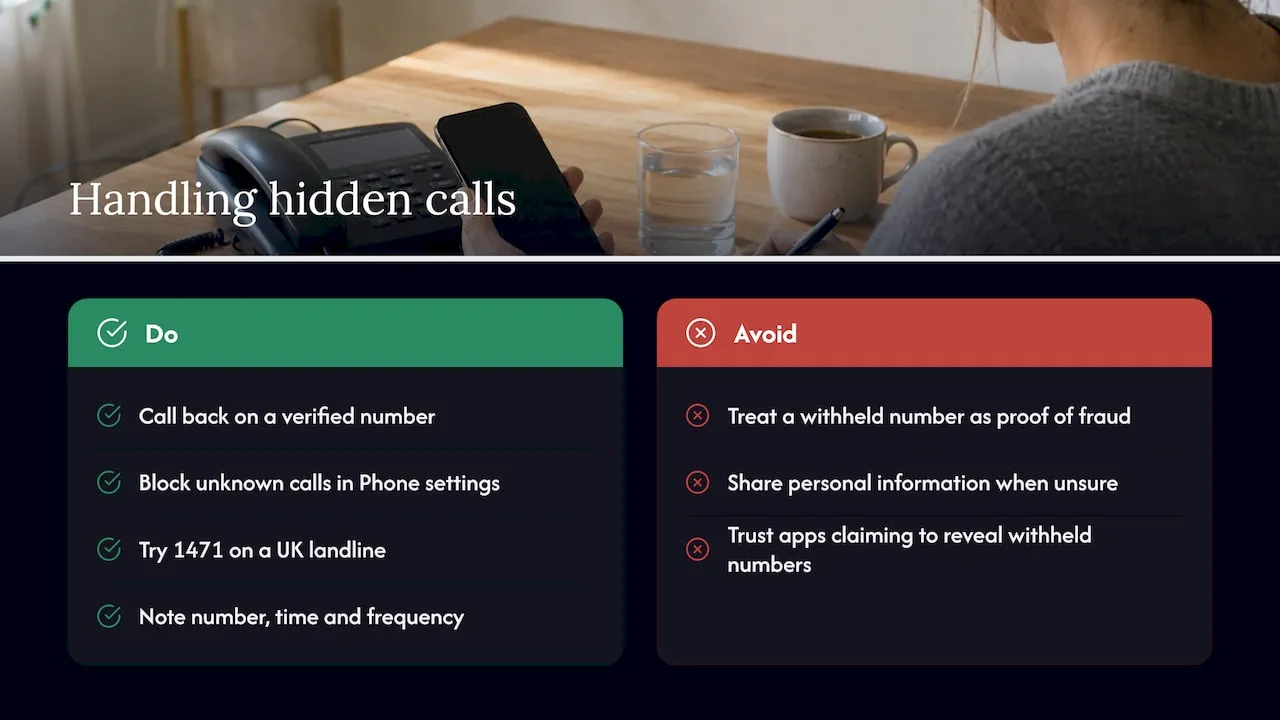
Not automatically. O2’s guidance on nuisance calls says a withheld or unknown number is not a definitive sign of fraud, because legitimate callers, including medical services and professionals, often withhold their number for privacy. If you are unsure, never give personal information, hang up, and call the organisation back on a number you have checked yourself.
If you want to block hidden calls on Android, the GotMyNumber guide says that in the Google Phone app you open the Phone app, tap More, then Settings, then Blocked numbers, and turn on Unknown. That blocks calls from private or unidentified numbers, and other phone makes have their own settings. Be aware that this can also block a genuine caller, such as a hospital clinic, who withholds their number.
Be sceptical of apps or websites claiming to reveal withheld numbers. If the caller suppressed their number at network level, that information is not sent to your phone, so a normal app cannot recover it. On a UK landline, Ofcom’s advice on unwanted calls notes that companies using diallers must display a number, and suggests trying 1471 on a landline, noting the number, time and frequency of calls, and contacting your phone company if the calls continue.
Why a number on screen is not proof of identity
Caller ID shows what was presented to the network. It does not prove who is speaking. Ofcom’s page on number spoofing scams explains that scammers can change their caller ID to disguise who they are, and that many handsets now show the number of the person calling, which is exactly what makes a spoofed number convincing.
The safe habit is simple and applies to both sides of the call:
- If someone claiming to be your bank or a government department rings, hang up and call back on the number printed on a statement or the official website.
- If you are the business, tell customers you will never ask for card details on an inbound call and invite them to ring you back on the number published on your site.
If a spoofed or odd-looking local number is bothering your customers or you, our guide to spotting UK VoIP caller spoofing and reporting it covers what to check. If you are the one trying to work out a private caller, this walkthrough on tracing a private caller explains what is and is not possible.
Caller ID for taxi firms, plumbers and other small businesses
Most articles on this keyword stop at the settings menu. For a business, caller ID is more than a setting. It is what customers see when you ring them back, and what they save in their phones after you have been out to fix a leak or taken them to the airport.
There are four things worth getting right.
1. Make sure the number you show is one you want called back
If you call customers from a personal mobile, they see that personal mobile. If they later ring it at 10pm, you take the call, or miss it. Many sole traders prefer to show a business number that rings through to the same handset. Our piece on which number shows when call forwarding is used walks through three checks to find out what your customer will actually see.
2. Do not hide your number on outbound sales or quote calls
Customers often ignore withheld calls, and some phones are set to block them, as described above. A taxi firm returning a missed booking call, or a plumber confirming an appointment, loses trust when the screen says No Caller ID. Show your number, and make it one that can be dialled back.
3. Use a number people can remember
A customer who needs a plumber in a hurry will not search their call log for a string of digits. They will ring the number they remember from the van, the card or a text. That is the reason memorable numbers exist: easy to read aloud, easy to repeat to a friend, easy to type from memory. Numbers beginning 01 and 02 are geographic landline numbers, 07 are mobile numbers. In our experience, tradespeople tend to value a local-looking landline number for trust and a mobile number when they work from a phone all day.
4. Keep the number if you change phone, provider or van
A number printed on vehicles and leaflets is an asset. Before you pick one, make sure you can take it with you. Our guide to choosing a UK phone number and keeping it through Ofcom porting steps sets out how that works.
Our perspective: caller ID is brand, not just a setting
We spend our days helping UK taxi firms, plumbers and small businesses find numbers customers can remember, so we see caller ID from the business end of the call. Our view is that people treat it as a technical feature when they should treat it as a small piece of marketing.
Numbers are no longer tied to local areas. A business can hold an 01 or 02 number from a town it likes the look of and use it anywhere, whether it forwards to a mobile, runs on a SIM or sits inside a telephony system. That freedom is useful for caller ID, because the number your customers see can stay the same while the phone, the provider or the driver behind it changes.
We would add two blunt points. First, never rely on the screen alone to prove who is calling. Spoofing is real, and a good business teaches customers to ring back on a published number. Second, do not hide your number when you are trying to win work. A visible, familiar, memorable number does more for call volume than any app.
If you are unsure what customers see when you ring them, test it: call a friend’s phone from each of your lines and ask what appears. It takes five minutes and prevents months of missed callbacks.
— Rob
Getting a business number that shows up well
If you want the number on your customers’ screens to be one they remember, you can search our database by number, sequence, area code or town, city or county. We sell and rent 01 and 02 landline numbers, 07 mobile numbers, 03 and 08 non-geographic numbers and alphanumeric phone names, and the numbers are portable across providers.
Before you commit, you can hold a number: a 30 day reservation is 10 GBP one-off, which gives you time to check how it reads on your vehicle livery or website. The number search covers landline and non-geographic numbers, and our mobile and memorable number pages cover the rest.
Once you have a number, there are several ways to connect it to the handset or desk you already use:
| Option | What it is | Price |
|---|---|---|
| XL Premier Service | Number service for your business line | 9.60 GBP per month, plus 14.40 GBP one-off set-up |
| XL Hosted Voice Service with a VoIP phone (XLHV) | Hosted voice with a VoIP phone | 7.86 GBP per month, plus 30 GBP one-off set-up |
| XL-IP | Use your phone and number through your broadband router | 8 GBP per month, plus 99 GBP one-off for the router and set-up |
| XL Mobile SIM | A SIM so the number works on a mobile | 27.24 GBP per month |
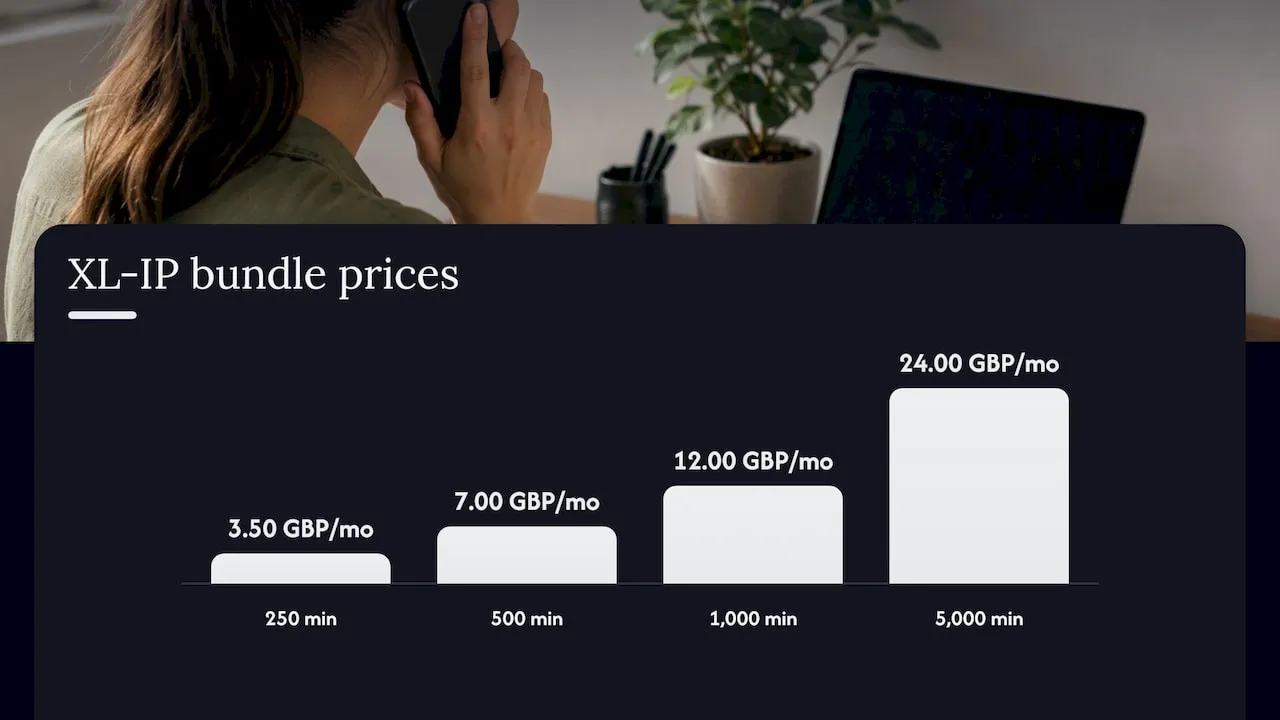
XL-IP also has call bundles to 01, 02 and 03 numbers and the top four mobile numbers: 250 minutes at 3.50 GBP per month, 500 minutes at 7.00 GBP per month, 1000 minutes at 12.00 GBP per month and 5000 minutes at 24.00 GBP per month. Taxi firms can also look at Taxi Connect Direct on the same page as the SIM.
If you want to compare how a number type affects what callers pay to reach you, read which UK business number costs callers up to 16p.
Quick checklist: set up caller ID on Android properly
Work through this once and you will know exactly how your phone behaves.
- Open the Phone app and go to Settings. Find Caller ID and spam, and decide whether you want the lookup on. It sends non-contact numbers to Google, so switch it off if that bothers you.
- Go to Calling accounts, choose your SIM, then Additional settings, and check that your own caller ID is set to show your number.
- Ring a friend from your phone and ask what they see. Ask them to try it on an iPhone and an Android handset if they can.
- If you forward calls, check the number that shows on the forwarded leg. Do not assume.
- Save your most important customers in your contacts, so their names appear whatever the network sends.
- Add a line to your website and confirmations saying which number you call from, so customers can verify you.
If you also want people to be able to check your number across messaging apps, our guide to verifying a UK business number on WhatsApp is a sensible next step, and five steps to verify a UK phone number covers the Ofcom and NCSC checks.
FAQ
What is caller ID on Android?
It is the feature that shows who is calling, using the number passed by the network and, where available, a name from your contacts or Google’s caller ID and spam lookup. It also covers whether your own number is shown when you call others. You control both in the Phone app settings.
Can I hide my number on an Android phone?
Yes, on most devices running Android 9.0 or higher, through your SIM’s call settings under Additional settings or Supplementary services. Some mobile operators do not support hiding, so test it. For one call, dial #31# before the number on a UK mobile.
Is a ‘No Caller ID’ call always a scam?
No. Legitimate callers, including medical services and professionals, often withhold their number. If you are not sure, give no personal information, hang up and call the organisation back on a number you have checked yourself.
Can an app reveal a withheld number?
Not reliably. If the caller suppressed the number at network level, it is not sent to your phone, so an ordinary app has nothing to read. Treat apps that promise otherwise with caution.
Should I call back an unknown number?
Be careful. Check the number against the company’s official website first, and be wary of numbers you do not recognise, since spoofing can make a number look genuine. If the call matters, ring the organisation on its published number instead.
Sources
- Ofcom: Calling Line Identification guidance
- Ofcom: Number spoofing scams
- Ofcom: Unwanted calls, texts and emails
- Google Phone app Help: Use caller ID and spam protection
- Sony UK: How do I hide my number when making a call?
- Samsung UK: How to hide your phone number or caller ID
- Digital Trends: Unknown Caller vs. No Caller ID
- GotMyNumber: No caller ID and withheld calls
- O2: Nuisance calls and texts
