Porting a SIM is a common way of describing something slightly different: you are moving your mobile number from one provider to another, usually onto a new SIM card, so people can still reach you on the same digits. In the UK you ask your current provider for a Porting Authorisation Code (PAC), hand it to your new provider, and the number moves across. Under Ofcom’s rules it should happen within one working day.
That is the short version. The details matter far more if the number is your livelihood. A taxi firm whose booking line goes quiet for a morning, or a plumber whose van-side number is on every leaflet, loses real money when a port goes wrong. This guide explains what porting is, how to do it, how long it takes, and where businesses trip up.
TL;DR
- Porting means keeping your existing mobile number when you change provider. The number moves; the SIM and the contract are separate things.
- To keep your number, text PAC to 65075. Your provider must reply with a code within one minute, valid for 30 days, according to Ofcom.
- If you do not want to keep the number, text STAC to 75075 instead, so you are not charged a notice period after you leave.
- Porting does not cancel your old contract by itself. Line up the port date with the end of your notice period to avoid paying twice.
- Business accounts with several lines usually cannot use the text route and need to ask by phone or through an online account.
Table of Contents
- What porting a SIM actually means
- How to port your mobile number in the UK
- How long does porting take?
- What porting does not do
- Porting for taxi firms and plumbers
- Landline porting is not the same thing
- Our perspective: the number is the asset, not the SIM
- Getting a memorable number that is yours to keep
- A pre-port checklist for businesses
- Common mistakes
- FAQ
- Sources
What porting a SIM actually means
A mobile number is not permanently attached to a SIM card or to a network. Ofcom describes number portability as a regulated facility that lets customers keep their numbers when changing provider. Moving the number is called porting.
People search for this in several ways: “port SIM”, “mobile number porting”, “port in” (the American phrase). They all mean the same thing. You keep the number, you change who looks after it.
Three terms help:
- Losing provider: the company you are leaving.
- Gaining provider: the company you are joining.
- PAC: the Porting Authorisation Code, the key that tells the old provider to release the number to the new one.
One point confuses almost everyone. Porting is only a technical migration of the number. The contract and the connectivity are separate. When your new provider takes your number, it does not automatically end your old agreement. You remain liable for any remaining term or notice period unless you coordinate the end date yourself.
How to port your mobile number in the UK
Ofcom’s Auto-Switch process was built so that you do not have to speak to your old provider just to leave. The steps for a single personal or sole-trader line are below.
- Request your PAC. Text PAC to 65075 from the number you want to keep. Ofcom says your provider must reply with the code within one minute, and that it is valid for 30 days.
- Give the code to your new provider. You can often do this while signing up. A PAC is typically nine characters: three letters followed by six numbers, as one UK network explains.
- Wait for the switch. The new provider arranges the move. Ofcom requires the port to complete within one working day of the gaining provider receiving a valid code.
- Insert the new SIM when told to. Until the transfer finishes, the new SIM may carry a temporary number. Once the port completes, the old SIM stops working for good.
You can also request the code by calling your provider or through its website. Ofcom notes you must use one of those methods if you have more than one number on the account, for example a family package.
PAC or STAC: which one do you need?
| PAC | STAC | |
|---|---|---|
| Purpose | Keep your number and move it | Leave without keeping the number |
| How to request | Text PAC to 65075 | Text STAC to 75075 |
| Valid for | 30 days | 30 days |
| Main benefit | Number moves to the new provider | Switch is arranged without a notice period charge or double paying |
Both codes come from the same Ofcom switching guidance. If you only want a new number, STAC is the cleaner route. If the number is on your van, your website and your Google listing, you want a PAC.
How long does porting take?
The rule is one working day from the moment the gaining provider has a valid PAC. That is the regulatory target, and in practice it has some edges:
- Cut-off times. Providers can set daily cut-offs. A request that arrives after the cut-off, or on a weekend or bank holiday, may complete a working day later than you expect.
- Verification time. Providers may use multi-factor authentication before releasing a code. Ofcom’s guidance on multi-factor authentication for Auto-Switch covers how that interacts with the one-minute requirement, so the clock for the code can legitimately feel longer than a minute while you complete the checks.
- Brief downtime. Service can drop for a few hours around the switchover. Warn your regular customers if you can.
If a port drags on, we have written about why mobile ports sometimes miss the one day target and what you can do about it. Ofcom’s rules may also entitle you to compensation for excessive delay or loss of service.
What porting does not do
Before you start, be clear on these limits.
It does not cancel your old contract. This is the most expensive misunderstanding. If you still have months left, they are still payable unless you agree otherwise. Ask for the PAC near the end of your term or notice period, not simply when you feel like switching. Use a STAC where you are not keeping the number.
It does not move your contacts. Contacts are often stored in your phone or cloud account, not on the SIM. Back them up before the port date, because the old SIM will deactivate when the port completes.
It is hard to undo. Once your new provider has the PAC and the process starts, it generally cannot be cancelled. Changing your mind means waiting for the port to finish and then porting out again.
It does not carry over your tariff. Allowances, roaming settings and voicemail are set by the new provider. Check them before you commit.
Porting for taxi firms and plumbers
A private individual who loses a mobile for a morning is inconvenienced. A tradesperson loses jobs. The same process applies, but the planning is different.
Multiple lines need a different route
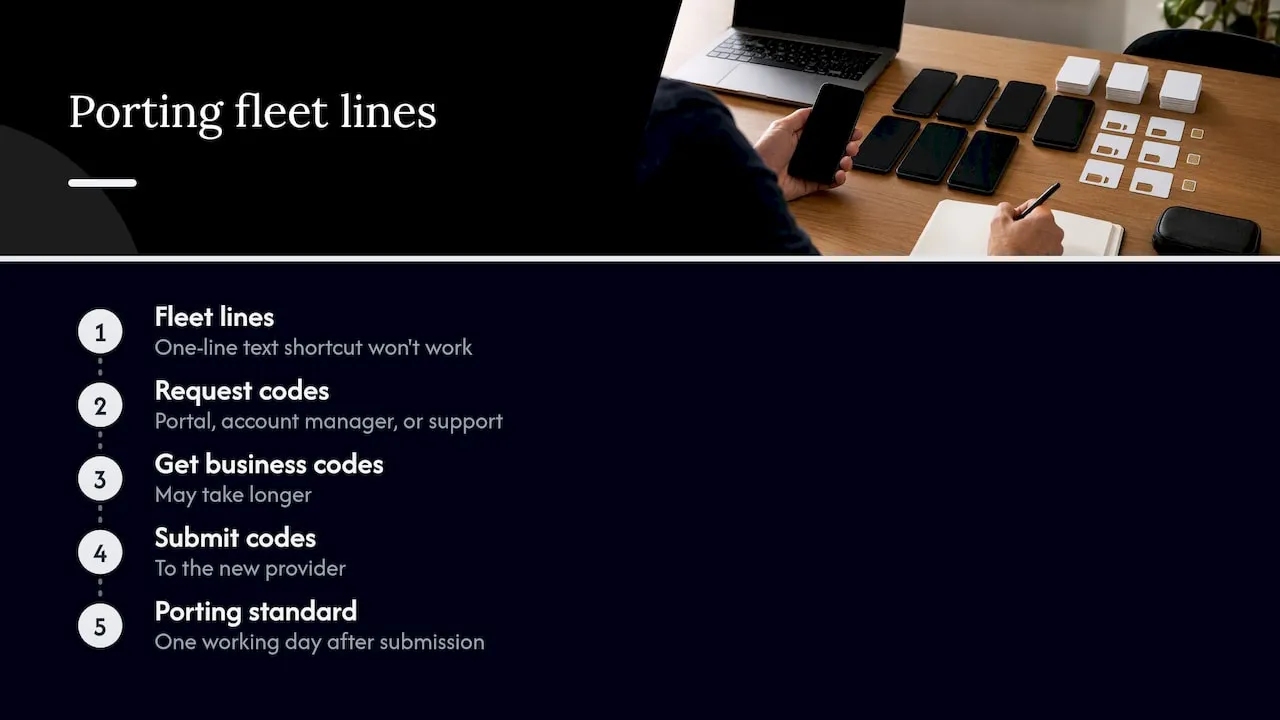
If a taxi firm has a fleet of mobile lines on one account, the one-line text shortcut will not work. You will need to request codes through the provider’s business portal, your account manager or its business support line. Allow more time than a single-line port. Ofcom’s standard still points to one working day once the code is with the new provider, but getting the codes in the first place can take longer on business accounts.
Time the switch around your busiest hours
Ports are scheduled by the providers, typically in the early morning to midnight range, so you cannot choose the exact minute. What you can choose is the day. A Tuesday morning is usually gentler on a plumber’s diary than a Monday after a weekend of burst pipes, and a taxi firm will want to avoid Friday or Saturday night and bank holiday weekends. Tell your regulars, and put a short message on your website and social profiles.
Check your dispatch software
When a number is ported, the network it lives on changes. Systems that send booking confirmations or “your driver is outside” texts often use network lookups to route messages correctly. After a port, check that any dispatch app, CRM or text service you use has been updated, or automated messages may fail to deliver. Send a test message to yourself before the first busy shift.
Do not port a number you do not control
A number can only be ported by the account holder. If a former employee or a friend set up the line in their own name, sort out the ownership before you request a PAC. Our guide on what you need to transfer a phone number covers the paperwork a business should have ready.
Landline porting is not the same thing
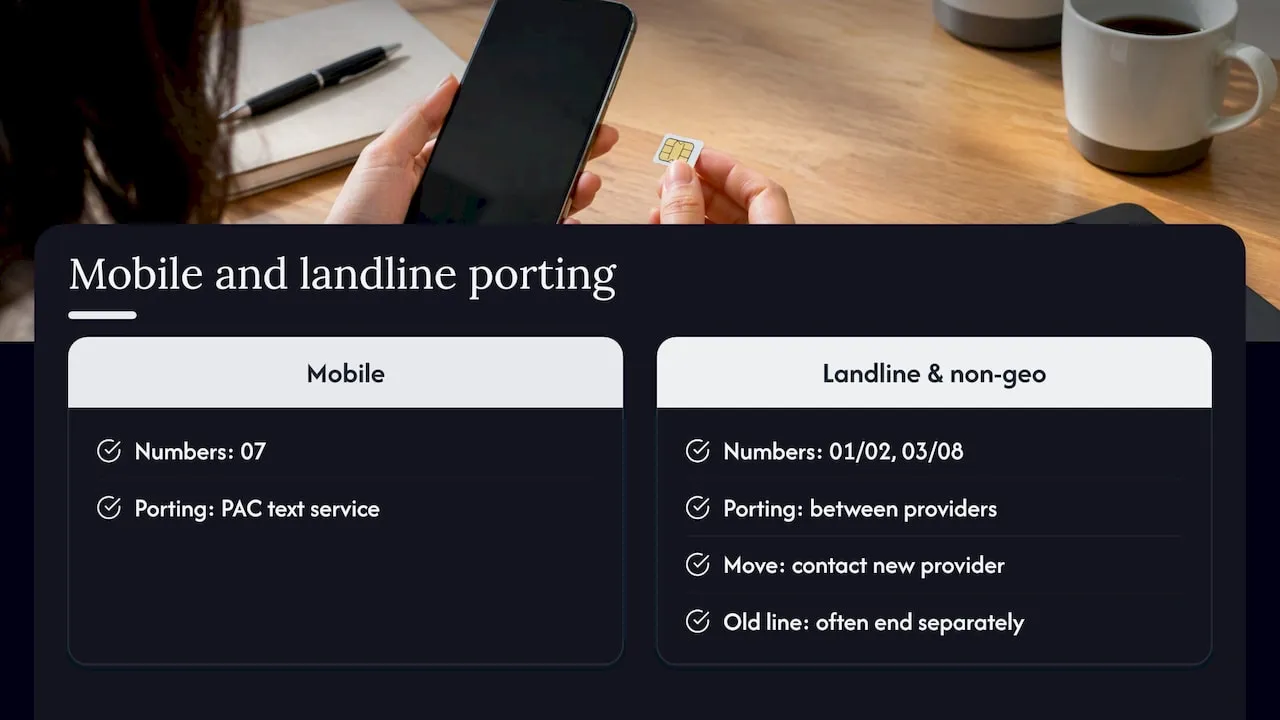
Everything above is about mobile numbers, which start 07. Landline numbers (01 and 02) and non-geographic numbers (03 and 08) are also portable, but the process runs between telephony providers rather than through the PAC text service. If you want to keep a landline number and move to an internet-based service, you will deal with the new provider directly, and the old line often has to be ended separately.
This matters now because the UK is retiring the traditional copper phone network. If you rely on a landline-style number, our piece on staying reachable during the UK PSTN switch explains the options. For a quick look at how the number types differ in cost to callers, see our comparison of landline and mobile business numbers.
Our perspective: the number is the asset, not the SIM
We sell and rent memorable UK numbers: 01 and 02 landline, 07 mobile, and 03 and 08 non-geographic. We see the same pattern repeatedly. A sole trader spends years building recognition around one number, then treats the SIM and the contract as if they were the same thing. They are not, and the sooner you think of the number as a business asset, the fewer nasty surprises you get.
Some things we would tell any taxi firm or plumber:
- Numbers are not tied to local areas any more. A 01 or 02 number can be used anywhere in the UK, so a memorable local-looking number works wherever your van is parked.
- Keep the number separate from the connection. If the number can be forwarded, used with a SIM or placed on a telephony system, switching suppliers later is a much smaller job.
- Memorable beats clever. A repeated pattern or easy sequence is quicker to say over the phone and easier to remember on the side of a vehicle. If you are choosing one, our guide to choosing a UK number and keeping it through the porting steps is a good place to start.
- Plan the exit before you sign. Know the notice period, and know who will give you the code when you leave.
The best porting day is the dull one: the code arrives, the number moves, nobody notices.
— Rob
Getting a memorable number that is yours to keep
If you are thinking about porting because your current number is forgettable, there is another route: start with a number people will actually remember, and make it portable from day one. You can search our database by number, sequence, area code or town, county or city at Phonenumbers.
A few options on our published price list, all subject to the details on each page:
- 30 day reservation: £10 one-off to hold a number while you decide.
- XL Mobile SIM: £27.24 per month, described on our rent or purchase page.
- XL-IP: £8 per month, plus £99 for the router and set-up, for keeping a number and phone working through your broadband router. See the XL-IP page.
- XL Premier Service: £9.60 per month with a £14.40 set-up fee, at the XL Premier Service page.
- XL Hosted Voice Service with a VoIP phone (XLHV): £7.86 per month with a £30 set-up charge, at the XLHV page.
Number prices vary by number and are shown in the search results, not here. Taxi firms can also look at Taxi Connect Direct on the rent or purchase page above.
A pre-port checklist for businesses
Run through this list before you text anything.
- Find your contract end date and notice period. Write them down.
- Confirm who the account holder is. It must be someone who can authorise the port.
- Choose the new provider and SIM first. You need it ready, because the PAC only lasts 30 days.
- Back up contacts and settings. Do not rely on the SIM.
- Request the PAC at the right time. One line: text PAC to 65075. Several lines: use the business portal or phone.
- Give the code to the new provider and ask for the switch date.
- Warn customers and staff. A short text or social post is enough.
- Check call forwarding, voicemail and dispatch software after the number has moved.
- Confirm in writing that the old service has ended, so nothing is billed beyond the date you expect.
If you want a cushion, forwarding the old number to a second line for the switch day means missed calls land somewhere. Our article on getting a business number on your mobile shows how to set that up quickly.
Common mistakes
- Requesting the PAC too early. You then have a 30 day countdown and may still be paying the old provider.
- Texting from the wrong SIM. The request must come from the number you want to move.
- Forgetting that a business account has several lines. The text shortcut will not cover them.
- Cancelling the old contract first. If you cancel before the PAC is used, you may lose the number.
- Leaving automated messages unchecked. Test confirmations and driver texts straight after the port.
FAQ
What is the difference between porting and switching?
Switching is changing your provider. Porting is keeping your number while you do so. You can switch without porting, in which case you get a new number, usually with a STAC so you are not charged extra notice.
Can I port my number myself?
Yes. If you are the account holder with a single line, you text PAC to 65075 and give the code to your new provider. Business accounts with several lines usually need to request codes through the provider’s business channels instead.
Does porting cost anything?
Ofcom’s guidance does not describe a charge for the PAC itself. Your cost is whatever you still owe the old provider and whatever the new provider charges for its service, so read both contracts before you start.
What happens to my old SIM after the port?
It stops working once the port completes. Until then, your new SIM may carry a temporary number. Keep the old SIM safe until the new one is confirmed working.
Can I cancel a port once it has started?
Generally not. If you change your mind after the new provider has your PAC, you would need to wait for the port to complete and then port out again. Think twice before handing over the code.
Sources
- Ofcom: Switching mobile phone provider
- Ofcom: Number portability
- Ofcom: Guidance on multi-factor authentication relating to Auto-Switch
- BT Help: Keep your BT mobile number
