Call forwarding (also called call diversion) redirects incoming calls to another number whenever it is switched on, so your phone stops ringing and the other line does instead. You set it on the handset or with a network code, and the forwarded leg of a call can be charged, so check your tariff before you rely on it, as EE explains for its customers.
TL;DR:
- Conditional rules can redirect busy, unanswered, or unreachable calls to another number, but they may override carrier voicemail; linked numbers keep separate settings.
- Many UK operators accept 61number# for unanswered calls, 62number# when unreachable, and 67number# when busy, but codes vary, so confirm with your operator.
- The forwarded leg may incur standard rates even when your plan includes minutes, and calls to mobiles can cost more than calls to landlines.
- An unauthorized diversion can expose calls and verification messages; check settings after a lost phone or suspicious message, and report unknown rules to your operator immediately.
Table of Contents
- What does call forwarding do, and which types are there?
- How does call forwarding work behind the scenes?
- How do you turn call forwarding on and off on an iPhone?
- How do you set up call forwarding on Android?
- Can you use star codes to set and cancel call forwarding?
- How do voicemail and linked numbers behave with forwarding?
- Who pays for forwarded calls, and what should you check on your tariff?
- How do you keep call forwarding secure?
- What should you do when call forwarding is not working?
- Why call forwarding matters for businesses with memorable numbers
- Can our numbers and routing simplify forwarding for you?
- FAQ
- Sources
What does call forwarding do, and which types are there?
Call forwarding picks up your calls before they reach you and sends them somewhere else. There are two families, and knowing which one you need saves a lot of fiddling.
- Unconditional (always forward): every call goes to the other number, and your phone does not ring at all.
- Conditional, when busy: calls move on only if you are already on another call.
- Conditional, no answer: calls move on after the phone has rung for a while without being picked up.
- Conditional, unreachable: calls move on when you have no signal or your phone is off.
Everyday examples are easy to spot. On holiday you might send everything to a relative or to a second phone. If your signal is poor at home, an unreachable rule keeps you contactable. If you are often on the line, a busy rule stops callers hitting a dead end.
Voicemail is the usual destination when nothing else is set, so a forwarding rule can override it. Some apps also offer a “ring all” style of behaviour, where several devices ring together, which is different from always forwarding to one place.
How does call forwarding work behind the scenes?
Forwarding lives in one of two places. Handset-configured forwarding is a setting in your phone’s menu, but in practice the instruction is passed to your operator, because the redirect has to happen in the network. Network-level forwarding is set with a dial code or through an account portal, and it works even if the handset is off.
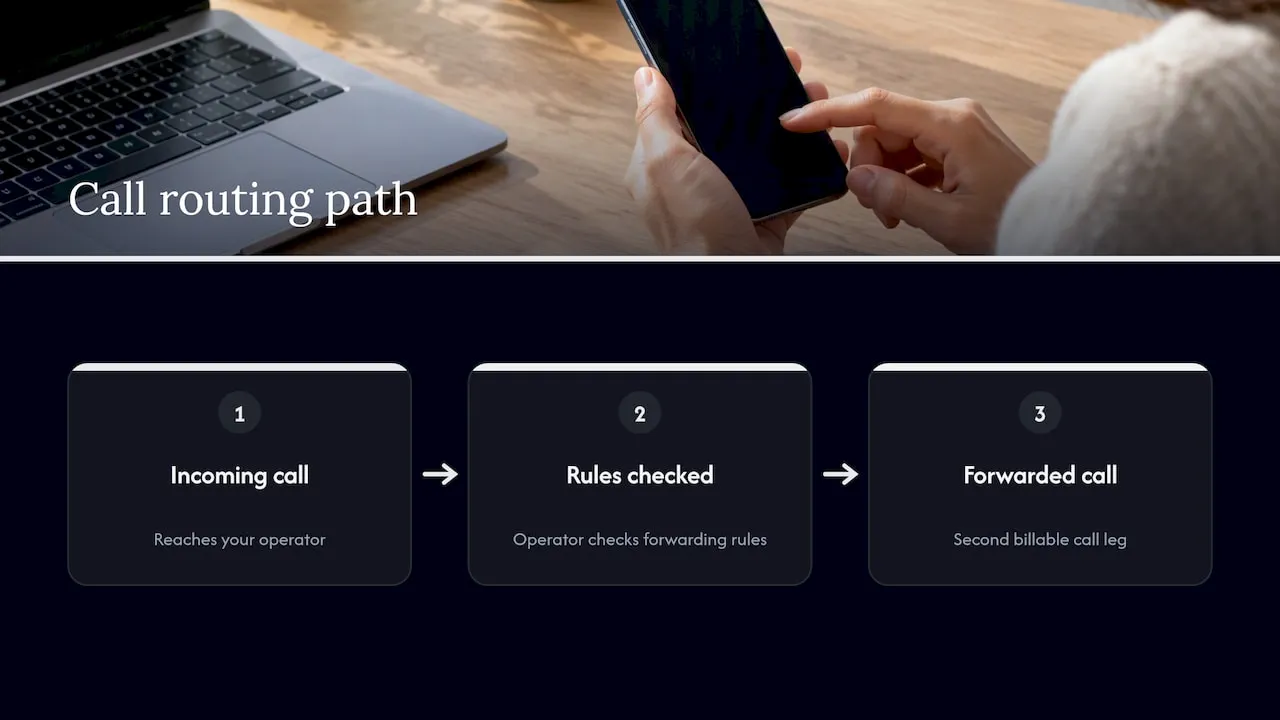
When someone calls you, the call reaches your operator first. The operator checks your rules, then routes the call on to the forwarding destination instead of ringing you. You are effectively paying for a second leg of the call, which is why billing matters (more on that below).
On caller ID, the person receiving the forwarded call usually sees the original caller’s number, but this depends on the operator and the type of line, so treat it as likely rather than guaranteed. Some networks show your number instead.
Emergency calls are different. Dialling emergency services generally bypasses forwarding settings, so help stays reachable whatever you have configured, as Apple notes in its safety documentation.
Our guide on operator-level versus handset-level forwarding goes deeper into who controls what.
How do you turn call forwarding on and off on an iPhone?
On an iPhone the setting sits in the main Settings app, and the steps are short.
- Open Settings and tap Phone.
- Tap Call Forwarding.
- Switch the Call Forwarding toggle on.
- Tap Forward To and type the number you want calls sent to.
- Go back to confirm the number is saved.
- To turn it off, return to the same screen and switch the toggle off.
Once it is active, a small handset-with-arrow icon usually appears in the status bar, which is your quick visual check that forwarding is on. EE describes this icon and the menu path for mobile customers.
Pro Tip: If the Call Forwarding option is missing or greyed out, your operator may require a network code instead, so try the star-code method in the section below.
Entering the number correctly matters. For UK destinations, our step-by-step forwarding guide shows how to avoid the common leading-zero error.
How do you set up call forwarding on Android?
Android phones differ by manufacturer, but the route is usually similar.
- Open the Phone app.
- Tap the three-dot menu, then Settings.
- Choose Call settings, then Call forwarding.
- Pick Voice call if asked, then choose a forwarding option.
- Enter the destination number and tap Enable or Turn on.
- To switch it off, return to the same screen and tap Disable on each option you set.
You will normally see four choices: always forward, forward when busy, forward when unanswered and forward when unreachable. Each one stores its own number, so you can send busy calls to one line and unreachable calls to another.
Samsung, Xiaomi and other brands rename or relocate these menus, and the Google Phone app can look slightly different again. Some operators also limit what the handset can change. To verify the feature is live, look for the forwarding icon in the status bar, or reopen the menu and check the toggle states. If the menu does not save, the star codes below are the dependable fallback.
Can you use star codes to set and cancel call forwarding?
Yes. Many UK operators accept star codes typed into the keypad as if you were making a call. These are typical examples only, and your operator may use different ones, so always confirm on its help page.
- Forward when unanswered:
*61*number# - Forward when unreachable:
*62*number# - Forward when busy:
*67*number# - Cancel a rule: the matching hash code, for example
##61# - Forward all calls (often used on home lines):
*21*number#, as shown in EE’s home phone guidance
Google lists the same conditional patterns, including *61*, *62* and *67*, with their cancel codes on its Google Voice voicemail help page.
After you press call, you should hear a confirmation tone or see an on-screen message. On landlines, a stuttering dial tone often signals that a diversion is active. If you get an error instead, check your operator’s help pages rather than retrying random codes. Our list of quick setup codes and UK scam checks is a handy reference.
How do voicemail and linked numbers behave with forwarding?
Conditional rules usually decide where an unanswered, busy or unreachable call goes next: either to another number or to voicemail. If you set a forwarding rule, it can take priority over your operator’s voicemail, so callers may never reach it.
Your carrier’s voicemail and a third-party service such as Google Voice are separate systems. To use Google Voice as your mailbox, you forward unanswered calls to it, and Google explains the process on its voicemail help page. Ring-all settings change things again, because every linked device rings together and whichever answers first takes the call.
Each linked number keeps its own settings, so check them one by one. A rule on your mobile does not change the rule on a number linked to an app.
Who pays for forwarded calls, and what should you check on your tariff?
Forwarding is commonly included in mobile plans, but the cost of the forwarded leg depends on your tariff. If the destination number falls inside your allowance, the call may be covered, as EE explains. Otherwise standard call rates apply.
Operators also warn that the diverted part of a call is often billed at standard dialling rates even when you have inclusive minutes, as BT Business sets out. Diverting to a mobile can cost more than diverting to a landline, and some providers charge set-up fees.
Before you leave forwarding on for weeks, read your plan or your operator’s help page. A quick check can help you avoid a surprise bill.
How do you keep call forwarding secure?
Forwarding can be abused. If someone gains access to your phone or account, they can divert your calls to a number they control and intercept messages or verification calls. Ofcom’s guidance on scam calls and messages advises checking your settings periodically for exactly this reason.
Simple habits help:
- Look at your forwarding settings regularly, especially after a lost phone or a suspicious message.
- Use a strong passcode and strong authentication on your operator account.
- Forward suspected scam texts to 7726, the UK reporting short code.
- Contact your operator at once if you find a diversion you did not set.
Pro Tip: Dial the cancel code for each forwarding type if you are unsure what is set. This can clear the rule.
What should you do when call forwarding is not working?
Work through the quick checks first.
- Look for the signs: a status icon, an intermittent dial tone or a confirmation message shows the rule is active.
- Fix the number format: for UK numbers, replace the leading zero with +44, as BT Business advises. Our guide to the +44 setup mistake explains why it trips people up.
- Restart and retry: reboot the handset, then re-enter the code or setting.
- Check restrictions: your tariff or account may limit forwarding.
- Contact support: if nothing changes, ask your operator or the device maker.
Remember that a dial tone alone is not a reliable sign of new voicemail when forwarding and voicemail are both configured, according to BT’s diversion guidance.
Why call forwarding matters for businesses with memorable numbers
My view is simple: forwarding is the cheapest continuity plan a small business has. A memorable number is only worth having if customers can always get through, and forwarding keeps that promise when you are out, busy or off signal. It also protects the number you have spent years putting on vans, signs and websites.
Hosted routing goes one step further. Instead of every person fiddling with handset codes, one change at the provider redirects everything. For smaller team, automated call routing shows how far that idea can go. Our guide to getting a UK business number on your mobile covers the practical setup.
— Rob
Can our numbers and routing simplify forwarding for you?
We sell memorable UK numbers that can be configured for forwarding and routed through hosted services, so one change at our end replaces a round of handset codes on every phone. That suits teams who want calls reaching the right person without anyone touching a menu. You can look at our options, including XL Premier Service at £9.60 per month, or search and reserve a number today.
FAQ
What is call forwarding on a mobile phone?
Call forwarding sends incoming calls to another number instead of ringing your phone. It is also called call diversion. You can set it in your handset menu or with a network code.
What does turning off call forwarding do?
Turning it off stops calls being redirected, so they ring your phone again as normal. If voicemail is set, unanswered calls go there. Cancel codes such as ##61# clear individual rules on many networks.
What is the code for call forwarding?
Many UK operators use *61*number# for no answer, *62*number# for unreachable and *67*number# for busy, as listed on Google’s help page. Codes vary, so check your operator’s help page before you dial.
Does call forwarding affect emergency calls?
No. Emergency calls generally bypass forwarding settings, so help stays directly reachable, as Apple notes.
Sources
- How to manage call diverts | Business Help | EE Business
- Using Call diversion to forward calls | How to divert calls | BT Business
- Send your mobile phone calls to Google Voice voicemail - Google Voice Help
- What to do about a scam call, text or message
